Forum Discussion

 Occasional Contributor
Quartus Prime Standard client can't connect to License Server
Client cannot connect to license server. LMTOOLS license is working properly. Client can ping the License Server.
- Quartus Prime Standard client version 17.0.0
- LMTOOLS v11.18.2.0
- Client must stay at version 17.0.0
- LM_LICENSE_FILE 1717@<Server> added to Environment Variables
Please advice
We have not heard from you and I hope that my last note in privet message clears up this matter. I will now transition this thread to community support. If you have a new question, feel free to open a new thread to get the support from Intel experts. Otherwise, the community users will continue to help you on this thread. Thank you.
11 Replies
 sstrell
Super Contributor
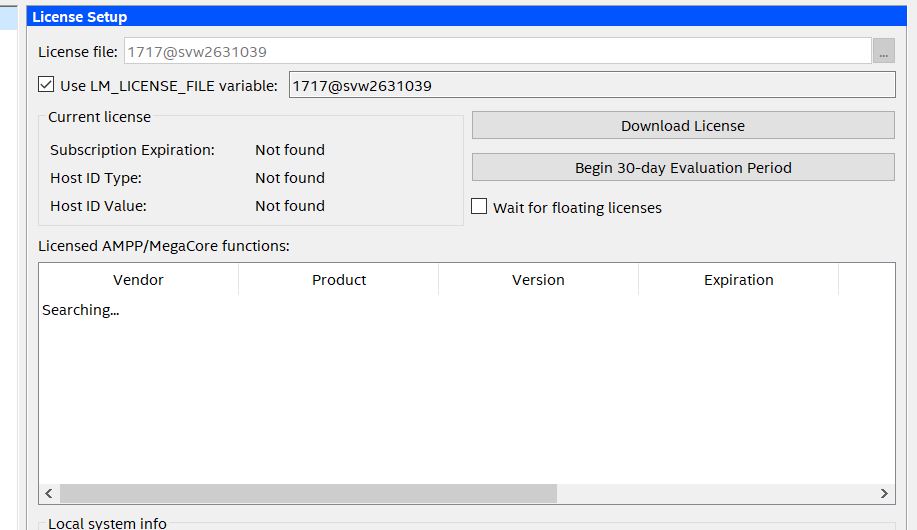
Did you add 1717@<server> to the license settings in Quartus itself (Tools -> License Setup)?
 MGRazor
- sstrell
Did you try turning on the checkbox there to use the LM_LICENSE_FILE variable?
- MGRazor
 AR_A_Intel
To narrow down this issue, can you please provide me the latest of the following?
1) Debug.log file
2) assembler report .asm.rpt file
3) Machine OS information
4) Output of “lmutil lmstat –a –c <port>@<address>” server and client
5) license.dat file
FYI, you can find debug.log file at LMTOOLS > path to the debug log file.
You can refer to this following YouTube on how to find debug log file ( min.2:55)
https://www.youtube.com/watch?v=llLaWatUbe8
And the asm.rpt.
The assembler report is located in <Project directory>/Output_files/<project_name>.asm.rpt.
You can also reply/attach your file in private message.
- AR_A_Intel
Hi
But before setting up license, would you kindly help check, whether your machine is supported or not (OS) by referring to link below:
https://www.altera.com/support/support-resources/download/os-support.html
The error is most commonly caused by the default ports are being used or a VPN/Firewall setting stopping the connection.
Make sure the port used by license server or vendor daemon is not blocked. The port number is required for Windows systems and should be outside of the 27000-28000 range and be unique on the machine. The following example shows how to specify port numbers in a floating license file. example, specify ports 1800, 1801, and 1802.
SERVER myServer 0123456789ab 1800
VENDOR alterad ./alterad port=1801
VENDOR mgcld ./mgcld port=1802
Please stop and restart the server. You need to allow the firewall access to the port number from both server and client machine.
If you have a Firewall or have other License servers running on the same machine you may need to change the Server Ports, this can be done by clicking the Server Ports button. FlexLM Port: Change this to avoid port conflicts If you have other License servers - the default is 27000
You can also refer to KDB link below https://www.intel.cn/content/www/cn/zh/support/programmable/articles/000080105.html
Refer to Setting up a License File in the License Server
Let me know if this information is helpful.
- AR_A_Intel
We have not heard from you and I hope that my last note in privet message clears up this matter. I will now transition this thread to community support. If you have a new question, feel free to open a new thread to get the support from Intel experts. Otherwise, the community users will continue to help you on this thread. Thank you.