Forum Discussion

 New Contributor
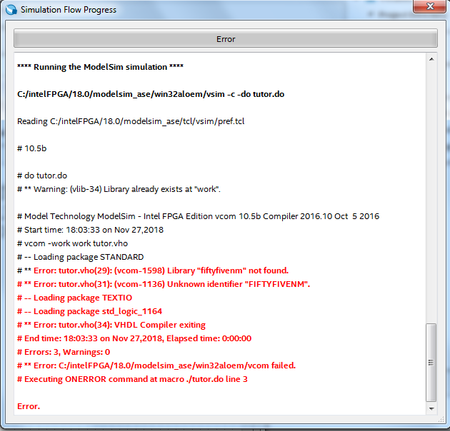
Problème when simuling with modelsim error 1598 and 1136 fiftyfivenm not found

 Frequent Contributor
I looked at your Project file and it seems you have set the incorrect ModelSim simulator variable. You may have set the path to ModelSim Intel Edition in the path for the Standalone ModelSim option.
Open the QSF file ( tutor.qsf) in notepad or any other text editor and search for the following line:
set_global_assignment -name EDA_SIMULATION_TOOL "ModelSim(Verilog)"
Change this to the following:
set_global_assignment -name EDA_SIMULATION_TOOL "ModelSim-Altera (Verilog)"
Save and close the file. Now, invoke Quartus tool, click Tools, then Options.
In the Options window, select EDA Tool Options and in the box for ModelSim-Altera enter the path to the installed Modelsim Intel Edition. Click Ok to close the window.
Now compile the design and run the RTL Simulation. It should launch ModelSim and compile the design and be ready for simulation.


