Forum Discussion

 Honored Contributor
Pin assignment does not show in graphic editor of Quartus II 16.1
Hello !
I have a strange problem: when I assign pin location to an input or output pin, it works but the assignment does not show in graphic editor. I can swithch on or off in (right click) Show menu but it does not matter. The same project, opened from a flash drive on another computer shows pin locations (Quartus 13.1). I have lost 2 days of time and tons of nerves but this problem persists. Is there a big in Quartus ii 16.1 ? I have projects on the same computer that behave normally in Quartus II, but whenever I start a project from anew I am unable to see pin assignments in the Graphic editor. How to solve this?3 Replies
 Altera_Forum
I presume you are talking about the Pin Planner, correct? Do you see your location assignments in the All Pins list at the bottom of the Pin Planner and/or in the Groups list? What view option(s) have you selected and what filters have you enabled? You might have a filter turned on that hides all currently assigned pins.
- Altera_Forum
Hi!
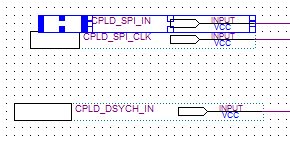
I'm using Quartus 17.0 and it seems I have the same problem as stipcevic. Although Pin Planner and Assignment Editor exhibit the correct pin assigment, the white rectangules next to the I/O ports on block editor appear blank. https://www.alteraforum.com/forum/attachment.php?attachmentid=15672  FCasa3
New Contributor
Hi. I have suffered just the same problem. The problem is due to the fact that leyend does not fit into the box for the pin number. You two options for solving it:
1.- The tedious one: Go pin by pin enlarging the box devoted to show the pin number
2.- The easy one: Go to Tools menu, select Options… and then select Fonts in the Block/Symbol Editor (in the left pane). On the right pane a box labeled Types of text will appear. Select Mapper & block I/O table text, and in the size selection pane below, choose a smaller font size. In my case I changed it from 8 to 7 and the pin numbers appeared again
Regards