Forum Discussion

 New Contributor
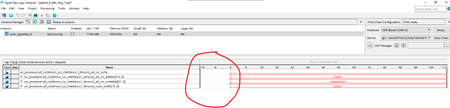
My signaltap test has some problem

 Community Manager
This is a well-known behavior that catches a lot of people, and it's actually documented — though the intermittent nature makes it feel like a bug. Here's what's happening:
Root cause: Trigger fires before the pre-trigger buffer fills
In configurations with non-segmented buffers running in continuous mode, the buffer must be full of sampled data before evaluating any trigger condition. Only after the buffer is full does the Signal Tap logic analyzer start retrieving data through the JTAG connection and evaluate the trigger condition. Differences in Pre-Fill Write Behavior Between Different Acquisition Modes If a trigger activates before the specified amount of pre-trigger data has occurred, the Signal Tap Logic Analyzer begins filling memory with post-trigger data, regardless of the amount of pre-trigger data you specify. For example, if you set the trigger position to 50% and set the logic analyzer to trigger on a processor reset, start the logic analyzer, and then power on the target system, the trigger activates. However, the logic analyzer memory contains only post-trigger data, and not any pre-trigger data, because the trigger event has higher precedence than the capture of pre-trigger data. Differences in Pre-Fill Write Behavior Between Different Acquisition Modes
That blank gap you're circling is the unfilled pre-trigger portion of the buffer — the trigger fired before the pre-trigger region could accumulate samples.
Why it's intermittent: Timing races between when you click Run Analysis, the JTAG handshake completes, and when the trigger condition occurs in the design. Adjusting sample depth changes how long the buffer-fill phase takes, which changes the race outcome — that's why random tweaks sometimes "fix" it.
Practical workarounds:
- Switch your trigger position to Pre (12% pre-trigger, 88% post-trigger) — to capture most data after the trigger, select Pre trigger position. Intel Quartus Prime Standard Edition User Guide Debug Tools This minimizes the pre-trigger window that must fill before triggering, reducing the chance of a blank gap.
- Use Storage Qualification mode instead of continuous. For buffers using a storage qualification mode, the Signal Tap Logic Analyzer immediately evaluates all trigger conditions while writing samples into the acquisition memory. Differences in Pre-Fill Write Behavior Between Different Acquisition Modes This removes the "wait for full buffer" requirement entirely, so the trigger is caught even at the very start of acquisition.
- Use In-System Sources and Probes in conjunction with the Signal Tap Logic Analyzer to force trigger conditions. Intel Quartus Prime Standard Edition User Guide Debug Tools This lets you control exactly when the trigger fires relative to when the analyzer is running.
The most reliable fix for your specific symptom is switching to a Storage Qualifier mode or setting the trigger position to Pre — that eliminates the pre-fill race condition entirely.
Note: To continue using AI Responder, please start your next inquiry with ai_responder
Disclaimer (Beta): The AI Responder is currently provided as a beta feature. AI-generated responses may contain errors or omissions. Please verify technical guidance with official Altera documentation before implementation.
Thank you very much.


