Forum Discussion

 Occasional Contributor
ModelSim wave.do - extra inputs in Wave window
 Occasional Contributor
I have recorded a video of my simulation flow. But I couldn't upload it here. Can I email it to you?
I didn't use testbench. I use the wave editor in the ModelSim.
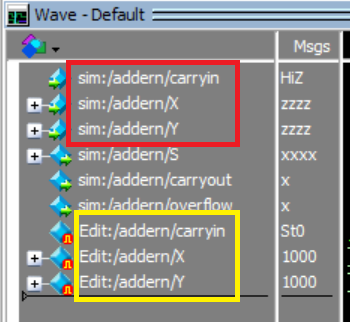
There is another problem, see the picture below. Although I have keyed in the input X = 1011, on the wave editor, it shows number 1000. Same problem with input Y = 1001, but the wave editor shows number 1000 again.

 Super Contributor
Hi @LChow3
I have send an email to you, you may send the video by replying in the email.
- RichardT_altera5 years ago
Hi @LChow3,
The reason you might seeing 1000 instead of 1011 for X is probably due to the wave editor tool limitation as it only read the initial bit value of either 0 or 1. Thus if you put 0111, you will see 0000 instead.
When you save format in wave.do, untick the Waveform formats if you do not want to see extra inputs.
Then add below command in the wave.do to show up the outputs simulation.
add wave -noupdate /adder/s
add wave -noupdate /adder/coutBest Regards,
Richard Tan
p/s: If any answer from the community or Intel support are helpful, please feel free to give Kudos.- RichardT_altera5 years ago
As design getting larger and complex, I would recommend to learn to write testbench for simulation.
Best Regards,
Richard Tan
p/s: If any answer from the community or Intel support are helpful, please feel free to give Kudos.- LChow35 years ago
Thanks. May I know where can I find the basic for learning the testbench for beginners? Can you send me the link?
Thank you.
- LChow35 years ago
Great, thank you.
- RichardT_altera5 years ago
I’m glad that your question has been addressed, I now transition this thread to community support. If you have a new question, feel free to open a new thread to get the support from Intel experts. Otherwise, the community users will continue to help you on this thread. Thank you.
Best Regards,
Richard Tan
p/s: If any answer from the community or Intel support are helpful, please feel free to give Kudos.


