Forum Discussion

 New Contributor
MAX10 ADC - getting it to simulate in Modelsim

 Contributor
Hi Rob,
May I confirm whether you are currently using Quartus Prime Lite Edition 18.1?
Could you also confirm the ModelSim version and edition being used? From your previous information, it appears to be ModelSim Intel FPGA Starter Edition 10.5b?
To better understand the ADC issue, could you please provide the following details?
- Are there any error or warning messages during simulation?
- Could you share a screenshot of the simulation waveform?
- Is this issue only observed in Quartus Prime Lite 18.1, or does it also occur in Quartus 17.1?
From the screenshot attached, all of the ADC was added directly into your ModelSim project, which means they will be compiled into the default work library. The MAX 10 ADC IP requires files to be compiled into separate libraries for the cross-language (VHDL→Verilog) binding to work.
According to the generated msim_setup.tcl script, the required simulation libraries and compilation order have already been defined for the design.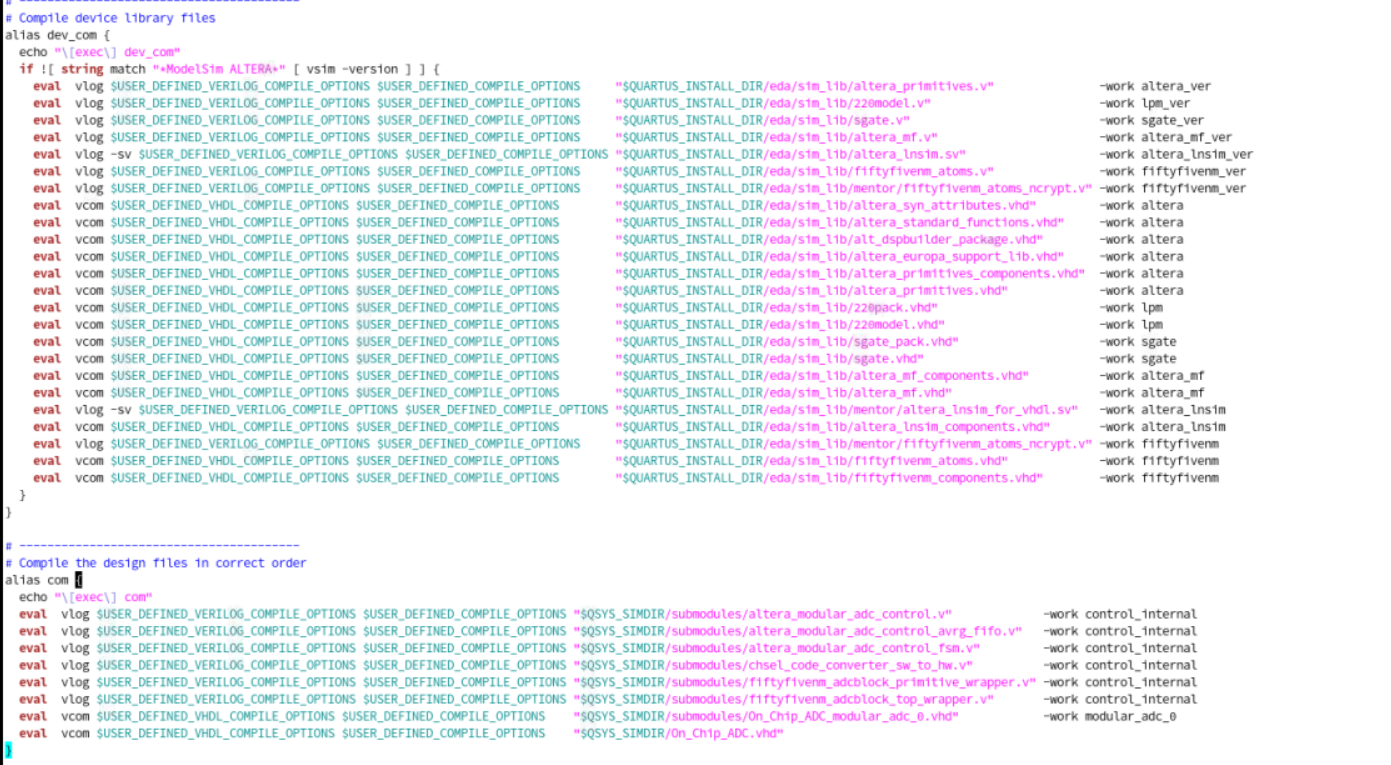
Here are a few suggestions that may help further troubleshoot the issue:
1. You mentioned that running msim_setup.tcl previously made no difference. Could you please try the following steps again from the simulation/mentor/ directory again?
set QUARTUS_INSTALL_DIR "/path/to/your/quartus/18.1/quartus"
source msim_setup.tcl
ld_debug
2. Could you also please check QUARTUS_INSTALL_DIR is pointing to the correct Quartus installation path before sourcing the script? The generated script appears to reference:
C:/apps/intelfpga_lite/18.1/quartus/
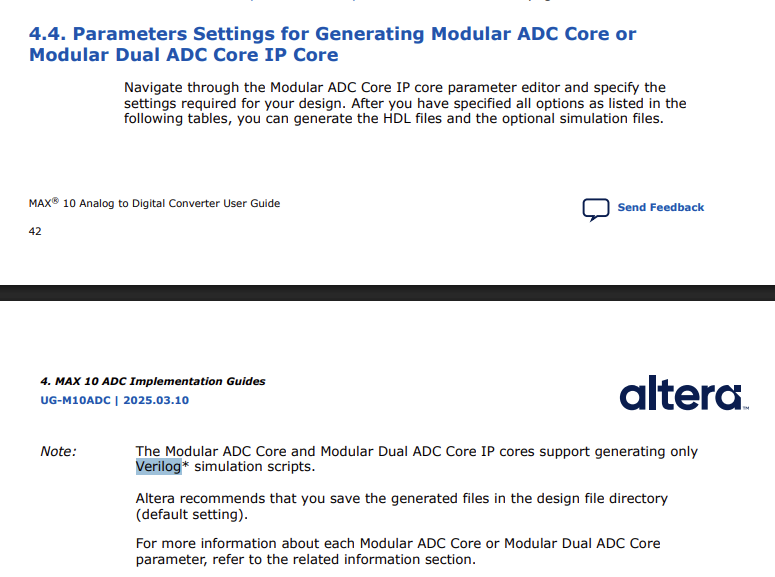
3. If the ADC outputs are still floating after the above steps, could you try regenerating the ADC IP with Verilog selected as the simulation language?
According to the MAX 10 Analog-to-Digital Converter User Guide, the Modular ADC core supports generation of Verilog simulation scripts only:
Feel free to share the results when you have them, and I'll be happy to help with the next steps. Thank you!
Regards,
ZiYingE_Altera
 New Contributor
Thanks for the reply.
I am using Quartus Prime 18.1.0 SJ Lite Edition and ModelSim - Starter Edition 10.5b
I attach screenshots of messages from the simulation.
I expect the key error is in loading the simulation:
“Component instance “modular_adc_0 : On_Chip_ADC_modular_adc_0” is not bound.
I no longer have Quartus 17 on my machine.
Back in the day we had trouble with Quartus 17 that was only resolved when an FAE came and sat with me.
Problems included, Quartus 17 IP generator put the ip files in the wrong folders, and Altera needing to give me a library "sim_lib for max10 ADC Quartus 17.zip" which needed adding to the ”quartus\eda\sim_lib" folder.
Other notes I have from back then say not to run ModelSim from within Quartus and to start the simulation using “vsim -L altera_mf_ver -L fiftyfivenm_ver -L lpm work.testbench” – I tried this and it doesn’t solve the problem.
I was hoping that by using Quartus 18 I could make a clearn start and avoid these issues.
I set QUARTUS_INSTALL_DIR and ran the tcl as you suggested. Screenshot attached – no errors, but nothing to say anything was compiled - I don’t know if that means it worked or not.
I tried rebuilding with verilog outputs. Attached.
I am apparently missing a step on how to tell Modelsim about the ADC,
- ZiYingE_Altera2 months ago
Hi RobGS,
Thank you for the update, and apologies for the delayed response.
Based on the message:
“Component instance “modular_adc_0 : On_Chip_ADC_modular_adc_0” is not bound.it appears that the ADC simulation model was not successfully compiled and mapped during elaboration. As a result, the simulator is unable to bind the ADC instance to its corresponding simulation library.
From the screenshot provided, it looks like msim_setup.tcl was sourced successfully. However, sourcing the script alone only defines the simulation environment and helper procedures. The actual compilation steps are performed by executing the commands generated within the script. You may need to proceed with the commands such as dev_com, com and etc.
For references, please refer to the following documentation for additional details: https://docs.altera.com/r/docs/683870/25.3.1/quartus-prime-pro-edition-user-guide-third-party-simulation/questasim-simulation-setup-script-example
In particular, Section 3.5, "Sourcing QuestaSim Simulator Setup Scripts" explains the additional commands required after sourcing the setup script.
Please let us know the results. If the issue persists, we will be happy to assist further.
Thank you!Regards,
ZiYingE_Altera- ZiYingE_Altera2 months ago
Hi RobGS,
Just following up on my previous message whether you had a chance to review it, or if my earlier reply may have been missed.
If you need any help, please feel free to let me know. I will be happy to assist further.
Regards,
ZiYingE_Altera- RobGS2 months ago
Thanks for your help on this.
Your response looks like it might help me, but it will be a while before I can get back to this.
For the moment we have made delivery to our customer without simulation, and are waiting on the customer’s response.
- RobGS1 month ago
Hi, ZiYingE,
Thank you for you patience.
I think I have this working now.
I figured out how to run the tcl scripts one at a time by setting QSYS_SIMDIR first to the On_Chip_Flash/simulation folder and then to the On_Chip_ADC/simulation folder.
Then running
source $QSYS_SIMDIR/mentor/msim_setup.tcl from each folder and running the "com" from each.
The final step which eluded me for a while was how to point Modelsim to the compiled files.
the tcl files gave me a nudge in the right direction, and I ended up with:vsim -L work -L work_lib -L onchip_flash_0 -L modular_adc_0 -L control_internal -L altera_ver -L lpm_ver -L sgate_ver -L altera_mf_ver -L altera_lnsim_ver -L fiftyfivenm_ver work.testbench
I now seem to be able to start simulation.
Many thanks again for your help and patience.
I'm happy to close this ticket.Rob
- ZiYingE_Altera1 month ago
Hi RobGS,
Thank you for the update and for sharing the details of your setup. This is helpful for future reference as well. I'm glad to hear that the simulation is now running successfully.
Since the issue has been resolved, I will proceed with closing the case. We will continue to monitor this post for the next 5 days.
If there are no further inquiries during this period, I will step back and allow the community to assist with any future follow-up questions.
Thank you for your patience and cooperation throughout the investigation too.
Best regards,
ZiYingE_Altera


