Forum Discussion

 New Contributor
License for Questa Starter Edition will not work
 1 month ago
I finally got it to work. I pointed SALT_LICENSE_SERVER to the license file in both user variables and system variables, and that fixed the problem.

 Contributor
Hi randomuser900,
May I know the Modelsim/ QuestaSim edition and version that you are currently using? And also, Quartus Edition and version installed in your machine?
Here are several suggestions you may try on:
1. Upgrade the Siemens daemon to saltd v11.19.5 if you're on version 2024.1. You may refer to the following KDB article: https://community.altera.com/kb/knowledge-base/error--flexlm-version-of-vendor-daemon-is-too-old/342390
2. Verify the MGLS_LICENSE_FILE environment variable. Since MGLS_LICENSE_FILE takes precedence, please ensure it points to the correct license path or port@hostname. It is generally recommended to define only one license source unless you are using multiple Siemens EDA products. For more information, refer to Section 4.1.2.1, "QuestaSim Software License-Specific Considerations": https://docs.altera.com/r/docs/683680/24.1/altera-high-level-synthesis-compiler-pro-edition-getting-started-guide/lm_license_file-environment-variable
3. Confirm the license was generated for the correct NIC ID / host — regenerate at SSLC if the machine changed. You may refer to https://community.altera.com/kb/knowledge-base/why-does-questa-license-fail-to-install-in-the-quartus%C2%AE-prime-lite-edition-softw/341018
Kindly let me know your findings, and I will be happy to assist further. Thank you.
Regards,
ZiYingE_Altera
ContributorHi randomuser900,
Thank you for the update. Glad that your issue is resolved. I will set this case to close status.
We will continue to monitor this post for the next 5 days. If there are no further inquiries during this period, I will step back and allow the community to assist with any future follow-up questions.
Thank you for engaging with us!
Best regards,
ZiYingE_Altera
 sselhorst1 month ago
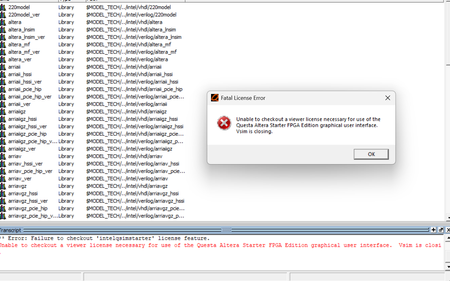
I am having the same issue randomuser900 was having. I have Quartus Prime Pro 25.3 with its Questa (the free version) installed. I have also installed Quartus patch 25.3-0.27. The Questa license from the SSLC matches the NIC ID on my laptop. SALT_LICENSE_SERVER points to the license file. I created a system SALT_LICENSE_SERVER environmental variable also pointing the same license file, which randomuser900 reported fixed the issue. I have tried the license file on both my c: and my d: drive. Nothing has worked yet. I placed the license file in d:\license\ directory. Please help.
When I start Quest by itself, which is way I will use it.
When I start Questa from Quartus
- sstrell1 month ago
Super Contributor
Your screenshot is showing that the license should be on c:\License\ but you say the file is on your d: drive.
- ZiYingE_Altera1 month ago
Hi sselhorst,
Based on the screenshot attached, it appears that the SALT_LICENSE_SERVER environment variable is pointing to: C:\Licenses\LR-182085_License.dat
However, you mentioned that the license file is currently located in: D:\license\
Could you please help verify whether the license file location matches the path specified in the SALT_LICENSE_SERVER environment variable? If the license file is stored on the D: drive, you will need to update the environment variable to point to the correct location.
After making any changes, please restart the machine to ensure the updated environment variable takes effect system-wide.
Kindly let me know how it goes after trying the above steps.
Thank you.
Regards,
ZiYingE_Altera- sselhorst1 month ago
My apologies. The c: drive vs d: drive discrepancy was a result of a copy/paste error with one of my attempts. I ended up regenerating a license from the SSLC. That particular problem is now solved.


