Forum Discussion

 New Contributor
JTAG connection Issues with Intel FPGA Development Environment
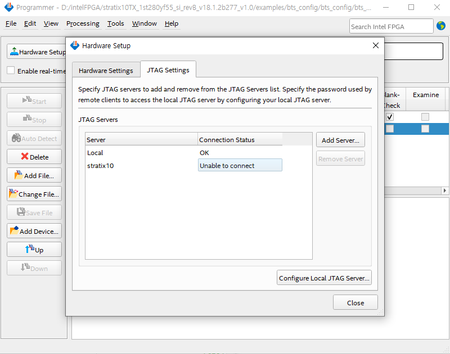

 Super Contributor
Are you trying to do remote JTAG, because that is what is showing as failing. In the Programmer Hardware Setup, go to the Hardware Settings tab instead and select the USB Blaster from the pop-up list. That should do the trick. Your jtagconfig output means that you're seeing the device.
 roy9705092 years ago
Thank you for your response. I'm curious if my understanding is correct that 'Hardware Settings' and 'Remote JTAG' refer to different configurations. Additionally, I'd like to inquire about the issue with the board test system (BTS). I'm encountering an error when running BTS, and despite following all the provided instructions, the problem persists. The error message is as follows:
Failed to register GUI application!Please make sure the following settings are correct:-Make sure device list on JTAG chain is correct.-Only one application instance is opened.-All service is closed which is opened or claimed by system-console.-Connect the board through on board USB-Blaster II.If all settings are correct and still have the problem, you can try the following methods and then restart this application:-Lower Jtag Clock with "jtagconfig --setparam <cable> JtagClock <value>" command.-End java and jtagserver.exe process on Windows Task Manager.-Power cycle the board.-Restart your computer.-Reconfigure the system MAX image.- sstrell2 years ago
Remote JTAG is having the board connected via USB blaster to a computer in one location (a JTAG server) and then you access it remotely from another computer. You don't seem to be doing this. Just go to the Hardware Settings and make sure the direct connection works.


