Forum Discussion

JChai1 New Contributor
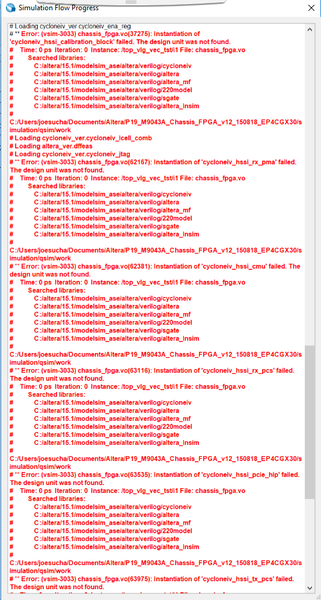
7 years agoNew ContributorHow to solve the errors below in Simulation Waveform Editor?

Abe Frequent Contributor
7 years agoFrequent ContributorYou need to edit the file from within the Waveform editor in Quartus. When you create the input waveforms for the design using the Simulation Waveform Editor, you have to do the following:
- After creating the waveform, Save the file and either rename it or leave the name as it is (Waveform.vwf).
- From the menu, click Simulation -> Simulation Settings.
- In the window that pops-up you have to modify the vwf name (if you have changed the name while saving it) in the "Testbench Generator Command" box. Scroll left and change all instances of the "Waveform.vfw" to the name you have specified earlier while saving it. You can also change the name of the generated .vwf.vt file.
- Under the Modelsim Script box make change the testbench name (*.vwf.vt) .
- In the next line you will see the vsim command. Here include the libraries mentioned earlier. "-L cycloneiv_hssi -L cycloneiv_hssi_ver -L cycloneiv_pcie_hip -L cycloneiv_pcie_hip_ver
- Click Save.
- Now, generate the testbench and the ModelSim simulation scripts.
- Now, everytime you simulate the design, it should include the necessary libs and compile/simulate.


