Forum Discussion

 Occasional Contributor
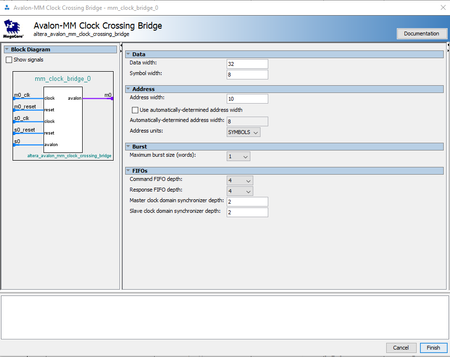
how to set those parameters of clock crossing bridge?
 1 year ago
I reviewed some diagrams on the website, and based on what I saw, option 2 is actually the correct setup. The diagrams clearly indicate that option 2 is the proper way to connect.
 Super Contributor
To connect your 80 MHz Nios to a 160 MHz IP, the Avalon-MM Clock Crossing Bridge should be the right solution and should work without changing your CPU frequency. The bridge safely manages data transfers between clock domains using FIFO buffers and synchronizers.
Key settings that you can try out:
- FIFO Depth: Start with 8–32 based on expected traffic.
- Synchronization Depth: 2 is standard and usually sufficient.
- Data Width: Match your system’s width (typically 32 bits for Nios and many IPs).
- Symbol Width: Usually set to 8 (1 byte per symbol).
- Burst Size: Set based on whether your IP supports burst transfers; otherwise use 1.
- Command/Response FIFO Depth: Larger values help if there's a lot of traffic or delay between domains.
In your case, the bridge should be configured with the Nios side as the master clock domain and the IP side as the slave. There's no need to increase Nios frequency—80 MHz is perfectly acceptable for this setup.
If performance issues arise, consider tuning FIFO depths or optimizing memory access patterns rather than increasing the processor clock.
Let me know if you have more question.


