Forum Discussion

 New Contributor
Free Licence for Max+PlusII
Hello to all,
the ALTERA Support request to ask my question here in this forum, so I am here ;-)
I tried to request a legacy Licence file form my old Max+PlusII (baseline 10.2) SW.
I got the login, the page, but when I have to add my machine ID (which is based om the MAC address, for example) it always answers with invalid ID.
How can I request a licence for this old SW (optimum an unlimited one ...)
Greetings
Chris OE3CPA
7 Replies
 OE3CPA
Thank you for this information and reply.
I exactly did this. I looked at the MAC address and I looked via License Setup in the SW, what number the Altera Tool sees. All consistent.
But what ever I used as MAC address, whatever I entered as ID (only 12hex digit, I tried the a to f in small and capital letters, I use NO colons etc ... real in the same format as license ID was reported by the tool), the Altera license web page always answered that as invalid ID.
And further the online support also asked for that ID and also reported that error. I only could create the support case by setting ID to ffffffffffff which seems to be accepted.What could be a reason, that a web tool does not accept the ID. In theory each 12digit number 0..9a..f should be accepted, what should the tool check for ... ?
Help is very welcome !Chris
- OE3CPA
Hello,
thank you for first answer. I am not sure, if my question was clear here. I had used end of the 90s the max+plus2, first with a kind of student version and later on it was a free version. I had to re-do the license all half years by giving my host ID reported as Info by Max+Plus2 (e.g. based on network).
I found now an license file generated 2020, seems to be the last time I managed it.
Now I tried to use the new web page for legacy licenses ...
It simply asks as first step for a host ID, and whatever I entered, it gave an error back (using small letters, capital letters for hex values ...). I also used exactly the format reported by Max+Plus2 info button on the license setup dialog box.So, I tried exactly the same method as on the old days, where I had to define a mail address (today this is a login) and the host ID, and some minutes later I got a mail with the license file as attachment.
How do I know get that free license for my Max+Plus2 setup I used in those days and re-used it shorty may be 5 years ago ...
Chris- OE3CPA
A further reply to your first post ...
How should the tool know, if my license is out-dated or not ?I do not need any history. I simply want a license file to my host ID (MAC). If I change my PC, I want to re-create a new license to my new MAC ...
How can the web tool not accept my host ID ? paveetirrasrie_Altera
Frequent Contributor
Hello,
Licensing team would be the right one to answer this. To submit the request, please follow the steps below:
- Log in to the SSLC Portal at https://www.altera.com/SSLC
- Go to Help
- Select Contact Customer Service
- Fill up the details & Click Submit
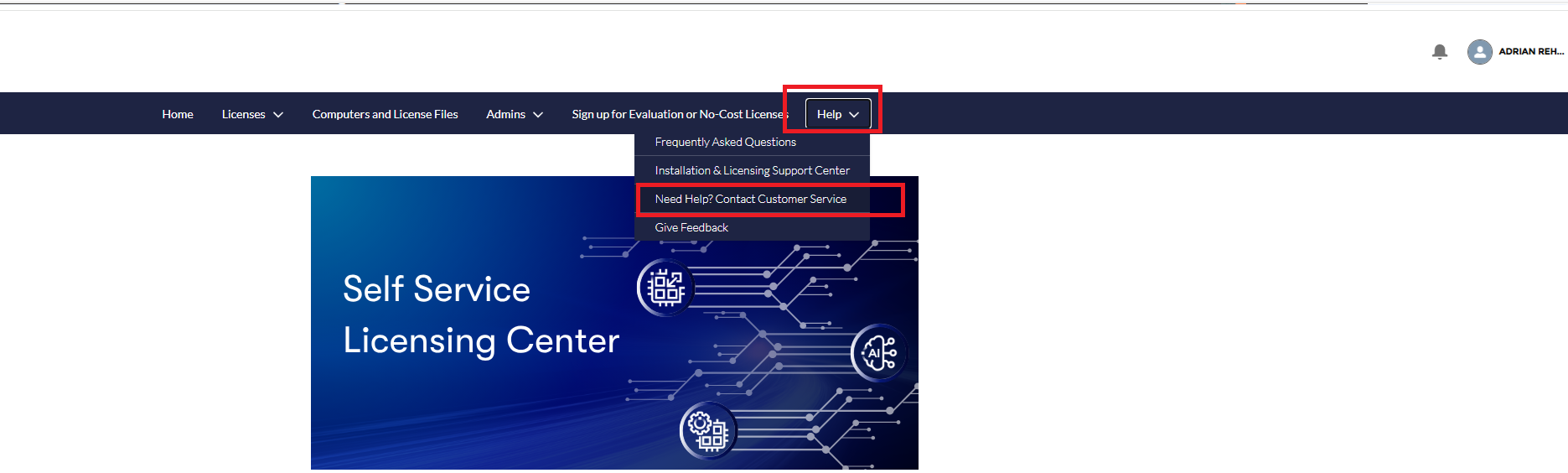
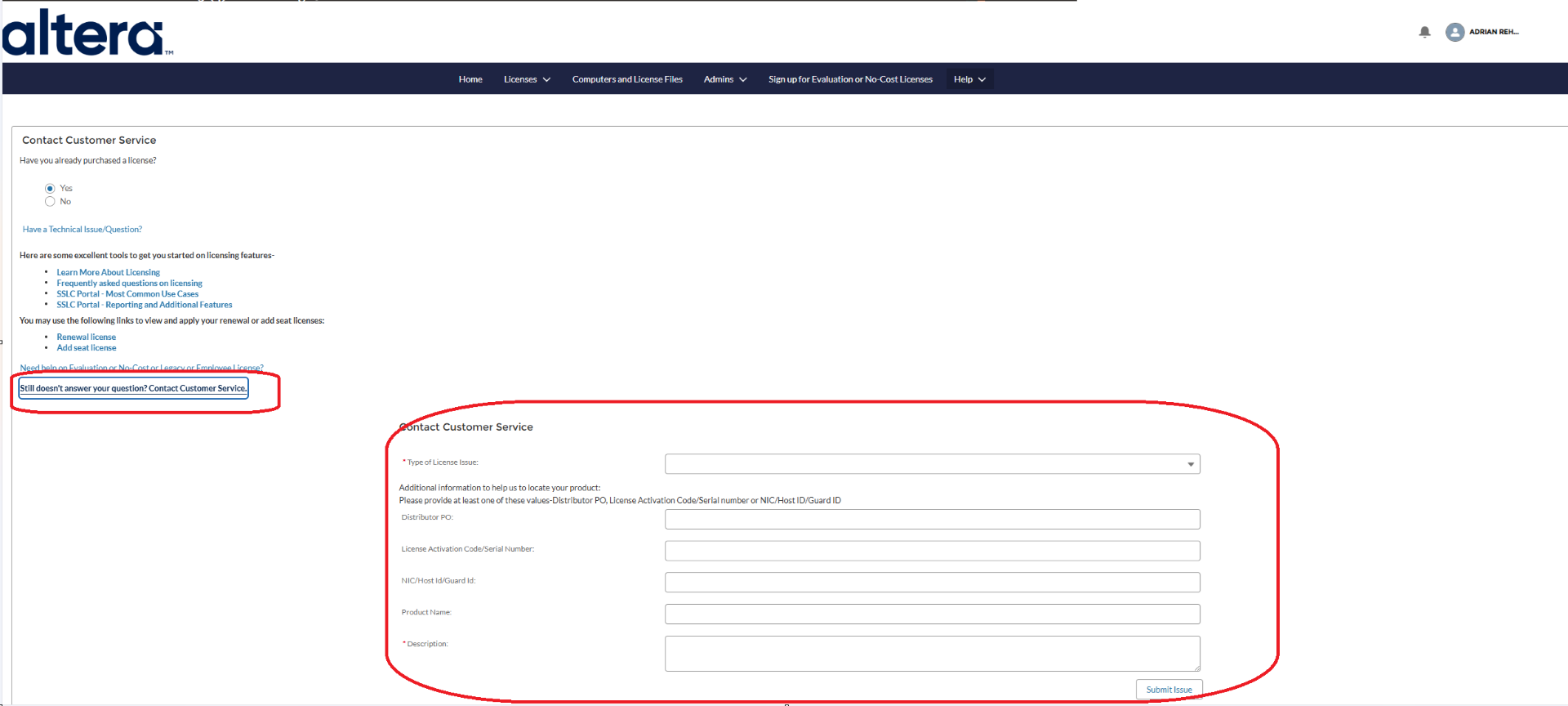
- paveetirrasrie_Altera
Hello Chris,
Try this sequence:
- In MAX+Plus II, open Options → License Setup → System Info and record the ID it reports.
- On Windows, run ipconfig /all. For a NIC ID, enter the physical/MAC address as 12 hexadecimal characters without hyphens, colons, or spaces.
- Check both Ethernet and Wi-Fi adapters. Use the adapter ID specifically reported by MAX+Plus II; avoid VPN, virtual, disabled, or disconnected adapters.
- If the legacy generator still rejects it, try the ID used by your successfully generated 2020 license or the original licensed computer. The legacy system may not recognize a newer machine’s ID.
- Do not manually edit license.dat; the host ID is included in the license signature, so changing it invalidates the file.
- If you receive a license but MAX+Plus II cannot find it, save it as license.dat, select it under Options → License Setup, and verify the path.
Regards,
Pavee
- paveetirrasrie_Altera
Hello Chris,
The legacy software and IP license generator will generate only licenses with maintenance expiration prior to January 1, 2009. For your case, it could have expired or MAC address is not similar to the previous license. You may try to generate new license instead for Max+PlusII.
Regards,
Pavee


