Forum Discussion

JordanD New Contributor
5 years agoNew ContributorFIR II Decimation Frequency Response
I'm designing a filter with the FIR II IP. Input data rate is 64 MHz and decimation factor is 8. I want the frequency response to be low pass cut off at 3.2 MHz.
The confusing thing is whether the ...
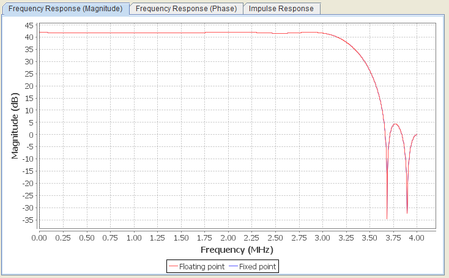

JordanDNew Contributor
5 years agoNew ContributorHello @CheePin_C_Intel
Thank you for response. I will respond to each of your items. Refer to the zip file attached earlier.
- Detailed steps
- From Matlab/Octave, set the directory to /decim_fir_sim and run the file fir_inspect. This will generate file decim_fir_input.txt.
- From ModelSim, set the directory to /decim_fir_sim. Enter command "do decim_fir_msim.tcl". This tcl script is provided with the IP, so you don't need to change anything. The IP testbench is already set to look for "decim_fir_input.txt" so it all just works. The sim automatically generates file "decim_fir_output.txt".
- From Matlab/Octave, run the same script again fir_inspect.m. This will read decim_fir_output.txt and make the plot.
- There are no changes to the default IP generated files.
- The Matlab script provided with the IP, decim_fir_model.m, generates the same output as the simulation. Beyond that, there's no use to using Matlab because it all depends what the data rate is. For example, grab coef_matrix_in from file decim_fir_mlab.m, and then run freqz(coef_matrix_in). This plots the expected frequency response, but the x axis is "normalized frequency". How does that map to what the IP is doing? That's the whole question.


