Forum Discussion

 New Contributor
Custom Library Unavailable in ModelSim after creating project
 5 years ago
Thanks for your help, ShyanYewT_Intel. I got my ModelSim project to compile following your suggestions, though not exactly. The steps:
1. Started ModelSim from command line from my Linux installation directory (../modelsim_ase/linuxaloem).
2. Created new library "cbgb" and mapping to it.
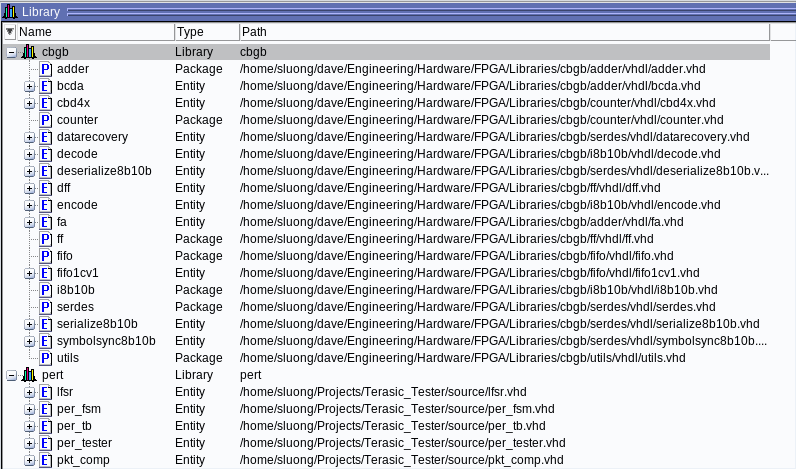
3. Compiled files into "cbgb" from personal repository directory (../libraries/cbgb/..). "cbgb" appears in Library window with all its compiled files.
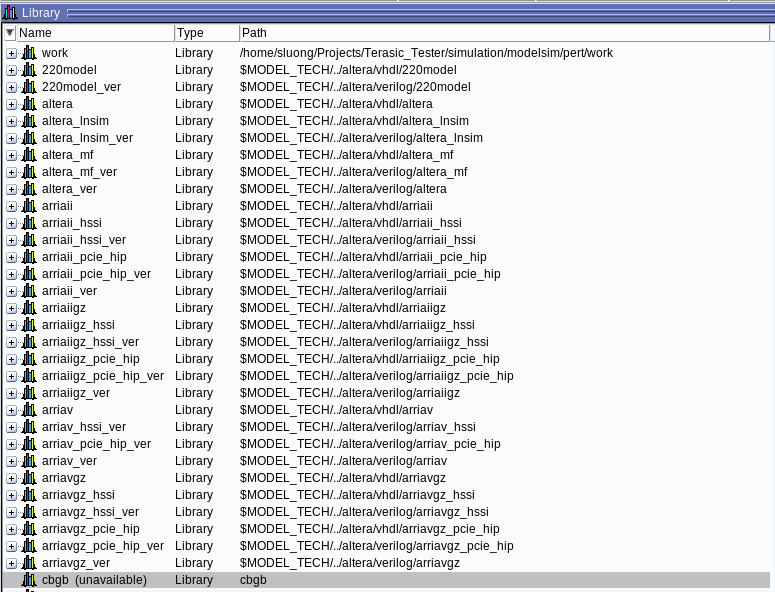
4. Created new project "pert" in personal project directory (../projects/../modelsim). Copied settings from (../modelsim_ase/linuxaloem/modelsim.ini) since there was no modelsim.ini in my project directory. This file is different from the read-only master modelsim.ini found in (../modelsim_ase). It got created sometime during the previous steps. "cbgb" library changes to empty "cbgb (unavailable)" in Library window.
5. Added files to project directory (../project/../modelsim/pert).
6. Edited "cbgb (unavailable)" library's Pathname to point to existing library (../modelsim_ase/linuxaloem/cbgb). "cbgb" library appears in Library window with all its compiled files.
7. Compiled my project.
New ContributorI did attach the 4 pictures to my original post, but they didn't show up. I couldn't find the Edit button for my original post either. So I'm attaching the pictures again, hoping they'll show up this time. If not, the ModelSim compilation errors are like:
../per_fsm.vhd : (vcom-1598) Library "cbgb" not found.
../per_fsm.vhd : (vcom-1136) Unknown identifier "cbgb".
Here are the relevant lines of code from per_fsm.vhd:
library ieee;
use ieee.std_logic_1164.all;
use ieee.numeric_std.all;
library cbgb;
use cbgb.i8b10b.all;
use cbgb.utils.all;
ModelSim cannot find my custom library "cbgb" since it appears as Unavailable as soon as I create a project. I had already successfully created the library "cbgb" and compiled all the files in it. The library and all its compiled files show up in the Library browser before I create a project, but then shows up as "cbgb (unavailable)" as soon as I create a project. I've followed the Intel and ModelSim simulation flows, tutorials, and examples, but they are not clear on how to work with multiple libraries. I need to use the "cbgb" library to compile the files inside my "work" library.

 Super Contributor
As you create a new project, when a window pop up, you will see a section calls "Copy Setting from".
By default, the Modelsim will direct to the modelsim.ini from the installation directory.
<install_dir>/modelsim_ae/modelsim.ini
Try to change it by browsing to the modelsim.ini in your project directory. See if the cbgb library still available.
If the above does not work, in your current project, you could try to add new library, mapping back to the existing cbgb library.
I hope it helps.
- shaunee5 years ago
Thanks for your help, ShyanYewT_Intel. I got my ModelSim project to compile following your suggestions, though not exactly. The steps:
1. Started ModelSim from command line from my Linux installation directory (../modelsim_ase/linuxaloem).
2. Created new library "cbgb" and mapping to it.
3. Compiled files into "cbgb" from personal repository directory (../libraries/cbgb/..). "cbgb" appears in Library window with all its compiled files.
4. Created new project "pert" in personal project directory (../projects/../modelsim). Copied settings from (../modelsim_ase/linuxaloem/modelsim.ini) since there was no modelsim.ini in my project directory. This file is different from the read-only master modelsim.ini found in (../modelsim_ase). It got created sometime during the previous steps. "cbgb" library changes to empty "cbgb (unavailable)" in Library window.
5. Added files to project directory (../project/../modelsim/pert).
6. Edited "cbgb (unavailable)" library's Pathname to point to existing library (../modelsim_ase/linuxaloem/cbgb). "cbgb" library appears in Library window with all its compiled files.
7. Compiled my project.
- RichardT_altera5 years ago
I am glad the issue has been resolved. I will now transition this thread to community support. If you have a new question, feel free to open a new thread to get the support from Intel experts. Otherwise, the community users will continue to help you on this thread. Thank you.