Forum Discussion

haianhle New Contributor
3 years agoNew ContributorAnalyze HDL file encrypt_1735
I encrypted the hdl file with encrypt_1735 (dti_phy_ctl_blk.v -> dti_phy_ctl_blk.vp)
"encrypt_1735 dti_phy_ctl_blk.v --language=verilog --quartus"
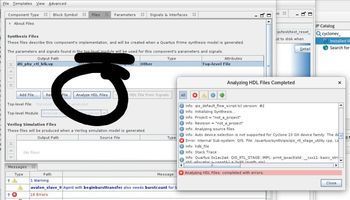
then I took that file to analyze and got an er...

ShengN_altera Super Contributor
3 years agoSuper ContributorHi,
If you already have the encryption key, do the followings:
- Encrypt the design with IEEE 1735. Command line used: encrypt_1735 --quartus --language=verilog counter.v
- File counter.vp will be generated in the file folder.
- Open a new project, add counter.vp in the project. Set it as top-level entity.
- Right click on the counter.vp. Select Properties. Ensure the Type: Verilog HDL File.
- Run Analysis & Synthesis.
Thanks,
Best Regards,
Sheng
p/s: If any answer from the community or Intel Support are helpful, please feel free to give best answer or rate 4/5 survey.

haianhleNew Contributor
3 years agoNew ContributorI have successfully Run Analysis & Synthesis file dti_phy_ctl_blk.vp
But I want to create components from my design so I use Platform Design
--------
I use Platform Design to create new components
1. I add dti_phy_ctl_blk.vp
2. Set type Verilog HDL
3. Set Attributes is Top-Level file
4. Run Analyze HDL Files
Then I got that error
Error: Internal Sub-system: QIS, File: /quartus/synth/qis/qis_rtl_stage_utility.cpp, Line: 705
Error: No modules found when analyzing [PATH]/dti_phy_ctl_blk.vp.
How can I finish creating a new component.


