Forum Discussion

Altera_Forum Honored Contributor
17 years agoHonored ContributorTurn on Leds
Hi,
I have managed to introduce linux in target DE2. These last days I was able to control a port of leds with the archive "nios2.h", but when I rebuilted the kernel I saw an interesting option: "linux_kernel_configuration-->Device_Drivers-->Led Support" I have tried to find information obout this option, some explanation about how to control,what things do... If someone can explain or give me a link of a web that explain this. I suppose that with this device driver I will control the port as I do with the archive nios.h but I don't know how. Thanks for the help.6 Replies
 Altera_Forum
You can use gpio to control the LEDs,
http://www.nioswiki.com/gpio You can control LED on/off with led sysfs class in /sys/class/leds. - Hippo- Altera_Forum
Hi,
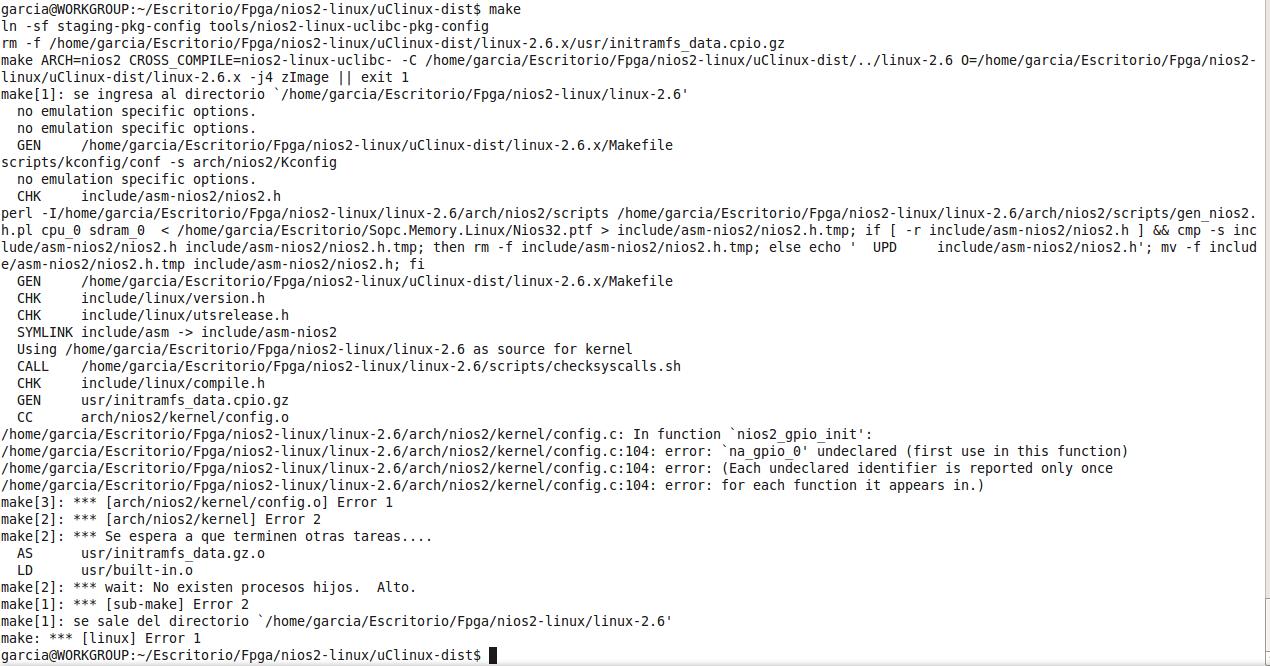
I have follow the instructions of NiosWiki about Gpio, but something I have done wrong because when I write in the terminal the command --> "make" appears an error about na_gpio_0 undeclared. Before writing make, I have written make menu config Where I pointed--> customize kernel and customize application. Also in processor type and features-->gpio interface and finally device driver-->led support. I attached a picture about the error, if someone can give a hand Thanks - Altera_Forum
Please check the hardware. The gpio instance in your sopc builder should be named as "gpio_0".
- Hippo - Altera_Forum
Thanks for your answers Hippo.
Doing in this manner I associated a Pio component(Sopc_Builder) with Gpio in linux.But what happens If I would like to insert another Pio component in Sopc_Builder and the two of them I would like to use with gpio. Then I would have two variables in Sopc_Builder for one gpio variable. The other question that I have is that in your first answer you said:" you can control led on/off with led sysfs class in /sys/class/leds." When I enter in /uClinux-dist/romfs/sys there aren't nothing , maby it is not the correct path? The drivers are installed(GPIO and LEDS), they appear in /uClinux-dist/linux-2.6.x/drivers Thanks a lot for your time - Altera_Forum
Please note that gpio and altera PIO is different. You can use them separated. Connect your LED to gpio.
For LED sysfs usage, please see, http://www.avrfreaks.net/wiki/index.php/documentation:linux/leds - Hippo - Altera_Forum
Is there anyway to make gpio *inputs* available in userspace? I have this LED stuff working, but now I need some inputs.
Here they descirbe a more complete interface where direction can be set via sysfs, but it does not seem to exist in the Nios2 Linux distro. http://www.avrfreaks.net/wiki/index.php/documentation:linux/gpio Is that not available for Nios2? Thanks, Dave ...