Forum Discussion

 New Contributor
Riscfree compilation error with message ".bss not within region onchip_mem"

 Occasional Contributor
Hello Thierry
I am new on the Nios V area, but will try to help you on this asking to some of the experts on this.
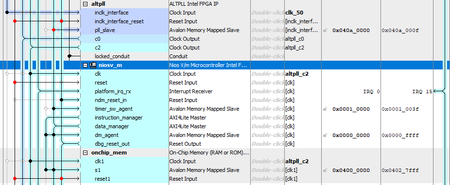
From the captures that you show, the settings that you have for the starting point of the .bss looks correct as this is inside of the On-chip memory.
Now, do you know if the size of the .bss section is defined somewhere? I am trying to determine if this fully fits in the On-chip memory.
Also, not sure if there is a link script available (a file with .ld or .icf extension). If this exist, here we also need to check that the .bss fits in On-chip memory.
For the issue related to using gmake from Matlab, it is possible that in the Path environment variable the Matlab path is being used before that the path of Quartus which means that it has higher precedence than the one for Quartus. You can try to modify this variable to include the path of Quartus before than the path of Matlab.
Thanks
Rolando
 New Contributor
Hi Rolando,
thanks for your help.
Regarding the .bss section, I have no idea of the needed size. I am attaching an archive file of my software directory (after performing a build clean). You might find some interesting informations inside. For completeness I join also the .sopcinfo file (in DE10_LITE_Qsys.zip file) from which the bsp (hal_bsp) was generated.
Regarding the gmake issue, I already have placed the Matlab path at the end of the PATH variable, but the behavior remains unchanged. I do not see a gmake.exe file in the Quartus installation tree directories. So, even though the Quartus variable takes precedence, no program is found. I deleted the gmake.exe file from Matlab directory. Riscfree throws an error saying that gmake is no longer available.
Best regards,
Thierry
- RolandoS_Altera1 year ago
Hi Thierry
I exercised the tutorial at the following application note: https://cdrdv2-public.intel.com/784469/an-784468-784469.pdf
At the section 1.2.2.4 there is an alternative to build the application .elf file from the command line instead for riscfree:
$cmake -G "Unix Makefiles" -DCMAKE_BUILD_TYPE=Debug -B software/app/debug -S
software/app
$ make -C software/app/debugHave you tried this? You need to do it after entering into the niosv shell. I was told that everything that you need is already included as part of the Quartus installation, so no gmake from other application will be needed. I just tried with the software directory that you provided using Quartus Pro 25.1 and was able to generate the .elf (attaching this one compressed).
So, I am guessing that the issue that you are seeing is from actually being using the gmake from Matlab.
Thanks
Rolando
- Thierry291 year ago
Hi Rolando,
I have attached the app and bsp directories that I generated (located in the "soft2" directory) so you can verify their accuracy. The next step is to import the project into Riscfree. The version of Riscfree I am using (v23.4.1, 3rd Nov 2023 installed with Quartus 23.1.1) does not implement the "Import Nios V CMake Project" option that is used in the application note 985.
Could you please tell me exactly how to import the project with this version of Riscfree?
Best regards,
Thierry


