Forum Discussion

 New Contributor
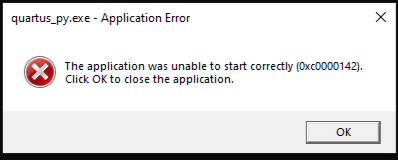
Failed to launch NIOSV Command Shell. Getting (0xc0000142) application error.
 New Contributor
The script for Windows 11 is ready, and attached in this article.
1. Update the required_files_win11.txt based on your system's Windows installation directory and Quartus installation directory paths.
2. Run generate_md5.bat (as shown below)
> generate_md5.bat required_files_win11.txt my_md5.txt
3. This will produce my_md5.txt
4. Run file compare
> fc required_files_win11_md5.txt my_md5.txt
5. This will report the lines that are different between the two files.
6. Please share your results with us.
Alternatively, you can also use Listdlls.exe (link).
1. Enter Nios V Shell
2. Run Listdlls.exe
> Listdlls.exe quartus_py > my_raw.txt
3. Run file compare
> fc required_files_win11_raw.txt my_raw.txt
Regards,
Liang Yu
 prashant_gohel1 year ago
Hi Liang Yu,
Thank you for sharing the script files.
I have executed the script as suggested and copied the command prompt log(compare_25.1.txt) to share with you. The script was run on a Windows 11 PC with Quartus version 25.1.
Could you please share the required_files_win11_md5.txt file for Quartus Prime Pro 23.4 as well?
Thanks and regards,
Prashant Gohel

