Forum Discussion

 Occasional Contributor
max10 remote system update nios with uart
 Occasional Contributor
Hello aiedb,
Yes, you are right.
The menu in the example software mentions below.
1: Write Image to CFM0
2: Write Image to CFM1 and CFM2
3: Trigger reconfiguration to CFM0(Factory Image)
4: Trigger reconfiguration to CFM1 and CFM 2(App Image)
Please check the software/remote_update.c in the example design for more details.
Regards,
Yoshiaki
 aiedb1 year ago
hii
when i press 2 to write image to CFM1 and CFM2
it asks me to enter the CFM1 start address and the CFM1 end address
in the map file that is generated by combining both(default+application) images the addresses are
0x12000 as start address
and 0xb9fff as end address
i tried to key in this addresses but i get an output that it is failing to write to addresses to cfm1!!!
note: i have my own fpga design for blinking the leds for counting pattern
and another design for to turn on the leds in sweeping pattern
i combined both of images according to the lab manual using HXD editor ,
and i also checked before by programming the designs on the kit
and i saw that they are working independently by a counting pattern and by sweeping pattern .
what is the address that i need to key in as CFM1 start address?
and what is the address that i need to key in as CFM1 end address?
- aiedb1 year ago
hiii
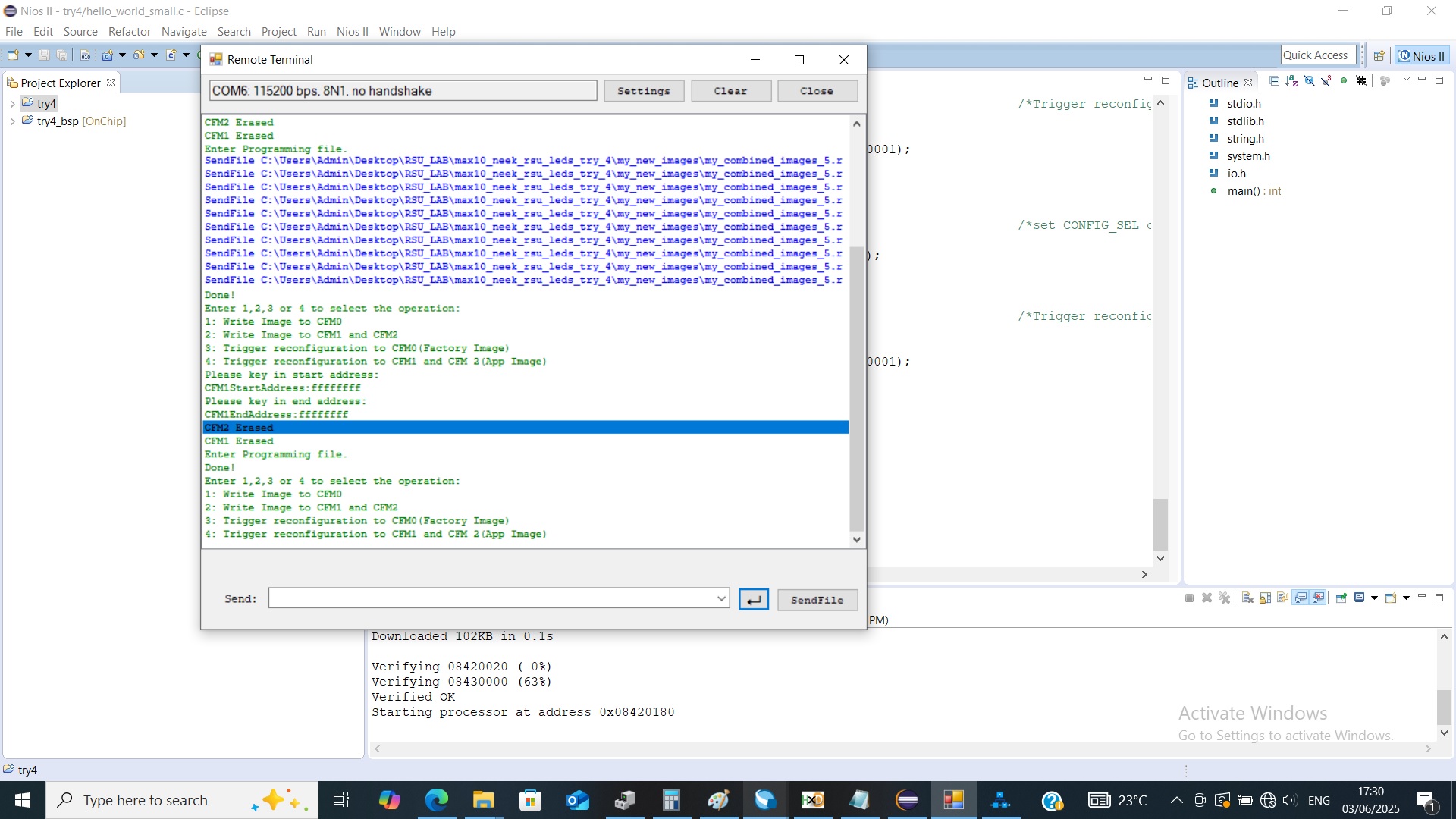
i looked at the qsys system and the addresses of the onchip flash of cfm1 is from 0x10000 to 0xb7fff so i keyed in those addresses and i get the done message in the terminal
so it seems that the writing to cfm1 with the new application is finished successfully so the programming by uart is done with out any errors
but some how after the done message i get the message request to key in the selection again and automatically the i get a message to key in start address and an end address again with ffffff although i didn't choose this option
i attached the picture to showcase what i mean
and when i press 4 to trigger the new application nothing happens the leds continue to blink with the default pattern
and even if i move the config_sel pin to 1 and turn the board off and on i don't see that the new leds pattern appears