Forum Discussion

 New Contributor
LPDDR4 not available in NIOSV/g linker script - Agilex-5, Quartus 26.1 Pro
 3 months ago
Hi dim1
Got it.
(This may come rather late for you, sorry about that. But I believe you will be interested in this new findings.)
There is another workaround for the Agilex 5 & 3 EMIF IP involving the isMemoryDevice agent information.
You may refer to this KDB.
Unlike the Add Memory Device workaround, this one is tied to QSYS. As such, isMemoryDevice workaround (repeat per new QSYS) is less repetitive compared Add Memory Device workaround (repeat per new BSP).
Besides that, the isMemoryDevice workaround fixes the problem from the roots in Platform Designer. Thus, the subsequent BSP Editor will work seamlessly (the experience of EMIF IP in BSP Editor will be akin to a OCRAM IP).
Regards,
Liang Yu
 Contributor
Hi dim1
dim1 wrote:In this thread, a similar problem seems to be mentioned - issue-with-bsp-creation-for-nios-vm-using-lpddr4-on-agilex-5-quartus-24-1--24-3
Yes, you are correct that it is the same problem. Reassure that it is resolved in Quartus Prime 26.1.1 Pro.
(Your post arrived first, while I am still preparing the KDB)
dim1 wrote:Does it mean that Address Span Extender IP must be used in order to have the LPDDR4 show in the linker script section, as an available memory device?
Not exactly.
- In the linked post, the user is connecting a 4GB 32-bit processor address map to a larger EMIF, such as 8GB. Minus 2 GB for other peripherals, you are left with 2GB processor address map to 8GB EMIF.
So, they need to connect a Address Span Extender IP between the processor & EMIF IP. - However, the Address Span Extender IP is still affected by this "no EMIF" issue in BSP Linker.
So, the workaround is to manually add the EMIF + ASE into BSP Linker.
They are two separate issues in a single post.
For your design,
- Your EMIF is able to fit inside the remaining 2GB 32-bit processor address map. No ASE IP is needed here.
- The EMIF IP is affected by the "no EMIF" issue in the BSP Linker. Currently, the workaround is to manually add the EMIF into BSP Linker.
Reference (Replace ASE IP as EMIF IP, and follow the same steps):
Regards,
Liang Yu
 dim14 months ago
Hello Liang Yu,
Thank you for your reply. Will try Quartus Prime 26.1.1 Pro once it is available.
Best regards,
D.
- dim13 months ago
Hello Liang Yu,
So I tried to manually add linker memory device, following the steps in the link you provided. Unfortunately, it does not work. What happens is, a second, duplicate device is created, and still not accessible for creating linker regions, section mappings etc.
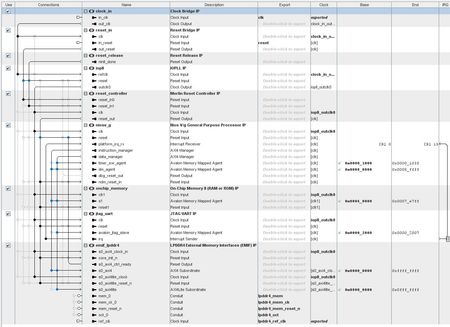
Here is how the memory map looks originally. The EMIF IP is shown as lpddr4_s0_axi4:
I add a new Memory Device, with name lpddr4_s0_axi4, Base Address 0 and Size 0x80000000.
This results in the following Memory Map:
Notice how now there are two lpddr4_s0_axi4 devices, and neither one of them is usable in the BSP Linker Script.
Please advise.
Thank you,
D.


