Forum Discussion

 Contributor
failed to execute :wsl dos2unix create-this-bsp..............................
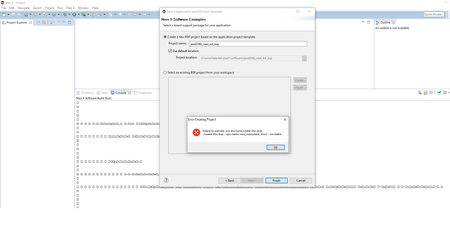
 4 years ago
I found a link to solve my problem,
Getting Start Install WSL - Terasic Wiki
do need to install ubuntu in windows?
it works anyway.
ContributorHere is how I encountered the problem, in AN 814
1.2.5.2 Rebuilding Software and Initializing the JESD204B Link
Perform the following steps to rebuild Nios II software, re-execute the software C code
and initialize the JESD204B link:
1. After device programming, navigate to the Tools menu and select Nios II
Software Build Tools for Eclipse.
2. In the Select a workspace dialog box, navigate to the software workspace,
<project directory>/software and click OK.
3. On the File menu, navigate to New and click Nios II Application and BSP
From Template.
4. In the Nios II Application and BSP From Template window, enter the
following information:
a. SOPC Information File Name:
• Intel Quartus Prime Pro Edition: <project directory>/
jesd204b_ed_qsys/jesd204b_ed_qsys.sopcinfo
• Intel Quartus Prime Standard Edition: <project directory>/
jesd204b_ed_qsys.sopcinfo
b. Project name: jesd204b_nios2_ed
Note: Project name is user customizable.
c. User default location: Checked
d. Templates: Blank Project
ContributorI found a link to solve my problem,
Getting Start Install WSL - Terasic Wiki
do need to install ubuntu in windows?
it works anyway.


