Forum Discussion

 Contributor
VVP Protocol Converter Not work

 Regular Contributor
Hi JLee25 ,
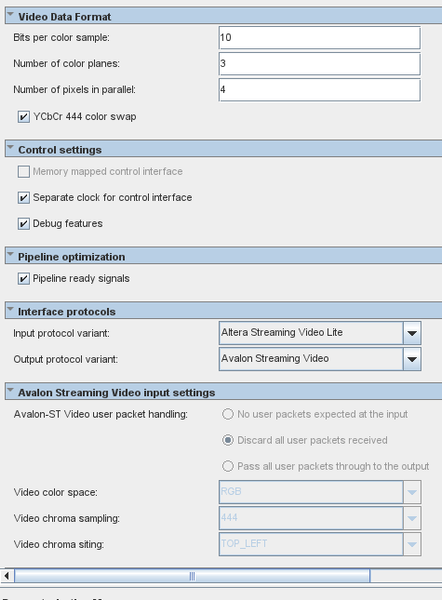
From your screenshots, the selected conversion direction looks correct for Altera Streaming Video Lite to Avalon Streaming Video, and your software is writing width, height, interlace, color settings, and the start bit.
The biggest thing that stands out is that the GUI screenshot shows Memory mapped control interface not enabled, while your software is writing Protocol Converter registers through the base address. In the user guide Document: Video and Vision Processing Suite IP User Guide (UG-20344 | 2026.03.03) Section: 7.5 Protocol Converter IP Registers , access to the register map requires the Avalon memory-mapped control interface to be turned on. If the screenshot matches the actual compiled instance, that is the first thing I would check.
Also, for the Lite-to-Avalon direction, the converter needs CPU-side frame information because AXI4-Stream video does not carry the geometry metadata needed on that side. The documented registers for Lite input are width, height, and interlace, which is consistent with what you are trying to program.
From the waveform, av_st_vid_out_ready is high and axi4s_vid_in_tvalid is high, but av_st_vid_out_valid remains low and axi4s_vid_in_tready remains low. That suggests the downstream side is ready, but the converter itself is not accepting the incoming stream yet.
I would suggest checking the following:
- Confirm the compiled IP really has the Avalon-MM control interface enabled. If not, the register writes may not actually control the core.
- Read back the status/debug registers and confirm the core reports running, has received a field, and whether the last field was marked broken.
- Verify the programmed frame info exactly matches the incoming stream: 3840 x 2160 and the correct interlace value.
- Verify the color-format settings. Your GUI shows YCbCr 4:4:4 color swap enabled, and the guide notes that the converter may swap Y and Cr planes for YCbCr 4:4:4 depending on the selected color-space/chroma settings. If your actual source is RGB or a different YCbCr format, the settings may not match the stream.
- Check that the AXI4-S Lite source is producing correct frame-boundary signaling consistently, since the converter should not keep tready low once configuration and format are valid.
My first suspicion is the control-interface setting mismatch between the GUI and the software access path.
My second suspicion is a stream-format mismatch, especially around the YCbCr 4:4:4 swap and color-format assumptions.
So in short, this does not look like downstream backpressure. It looks more like the converter is not becoming operational because either the control interface is not really enabled in the compiled IP, or the programmed input format does not match the actual AXI4-S Lite video.
I would strongly suggest you to try out our example design if you haven't, it will give you some tips where to start on.
Regards,
Wincent_Altera


