Forum Discussion

Altera_Forum Honored Contributor
14 years agoHonored ContributorVIP Clocked Video Output- MODES
I'm using the Clocked Video Output (CVO) core from the VIP (Video and Image Processing) suite
on Altera Cyclone III video development card with Bitec HSMC DVI input/output daughtercard to display a mixed video (non interlaced) on a DVI monitor. I want the CVO modes to display different output resolutions:1280x1024, 1024x768 and 800x600 The default mode configured in the QSYS hardware is for 1024x768 resolution. The way I configure the modes is: set mode invalid, write registers, stop CVO, set mode valid, start CVO. When I run this and ask for the "Video Mode Matched" register I get "0" with a 1024x768 input and it displays the image. But after changing the input I get the different modes from "Video Mode Matched" but I don't get any image and the display enters into sleep mode. So, my questions are... Where can I find all those video parameters, in case i'm not adding them correctly? Are there any examples which uses different output modes? Is there another possible error in my design?5 Replies
 Altera_Forum
Hi,
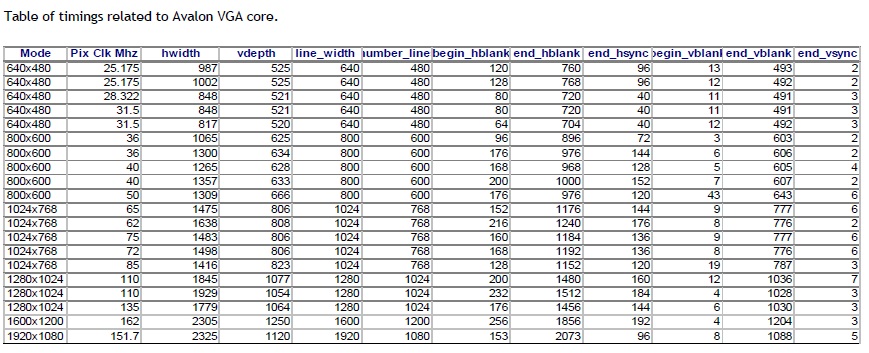
You can see the examples here. http://www.bitec.ltd.uk/ciii_video_dev_kit.html Also in one of the documents there is a table about the timings. What values of horizontal porch vertical porch should be used for different resolutions of image. Those timings values have worked fine for my design.- Altera_Forum
I went through the examples but I couldn't find any example of run-time configuration for the CVO. The timing table is useful, but now I'm confused with the different Pclk MHz frequencies. I'm using a constant frequency of 100MHz for the CVO, how should I interpret these values then?
Thank you - Altera_Forum
- Altera_Forum
This is the one I found in one of the examples. And it has different values.
dl.dropbox.com/u/16438728/bitecVGAtiming.PNG - Altera_Forum
Anyway, I've used different parameters but the problem is I get no output at all, my display enters sleep mode whenever I change the system video input. The CVO status bit is always 0 after writing the GO bit.
I also have a mixer with a TPG and a frame read from memory so I change the TPG resolution to the new one every time it changes after checking if the CVI is stable and has a valid resolution.