Forum Discussion

 New Contributor
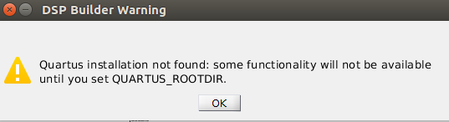
Quartus installation not found: some functionality will not be available until you set QUARTUS_ROOTD
 3 years ago
Hello,
Are you sure the Quartus installation directory should be in ./bin?
In page 21 of the guideline the default installation is in /opt/intelfpga<version>/quartus
Please check for the correct installation directory. Also, may I know which OS you are using?
Regards,
Nurina
 New Contributor
Hi,
I followed the steps provided in the section 2.3 of Handbook. (https://www.intel.com/content/www/us/en/docs/programmable/683337/23-1/faq.html) .
The following are the steps in detail.
1. Open the terminal from the dspba folder.
cd ~/intelFPGA_pro/21.3/quartus/dspba
2. Run dspbuilder.sh from terminal.
./dsp_builder.sh - m /usr/local/MATLAB/R2019a/
Matlab opens with the following notification
3. Then, after pressing OK, I started simulink.
4. From the DSP Builder tab on simulink new file window, open an example file. The simulation is working fine.
5. Then Design checker option from DSP Builder menu is working fine.
6. Then the verify design option from DSP Builder menu, brings the error again.
Thank you,
Sreejith


