Forum Discussion

 New Contributor
PCIE CHANGE SPEED
 New Contributor
Hello, we can't modify the deviceID either, could you provide some example? We just want to enumerate to the BIOS a maximun speed of gen2. We can do it from intel BIOS, but this option is not available for AMD processor, and we would like to change the value of maximun speed supported.
Thanks in advance and best regards.

 Contributor
A10 user guide below at section '5.7.1. Hard IP Reconfiguration Interface' has the description and timing diagram of hip_reconfig_* interface.
https://www.intel.com/content/dam/www/programmable/us/en/pdfs/literature/ug/ug_a10_pcie_avmm.pdf#page=56
- skbeh4 years ago
May I know what is your intention to modify the deviceID? Is that you want to try using the hip_reconfig* interface to modify the deviceID, after that use the same interface/method to also modify the speed_change_hwtcl to change the pcie link speed?
- ALega14 years ago
Good morning, first of all, first of all, the memory map is missed on the paper!!! "https://www.intel.com/content/dam/www/programmable/us/en/pdfs/literature/ug/ug_a10_pcie_avmm.pdf#pag..." We have the signals description, but nothing about the addressing of that bus!!!!, or some information about the register to be read or write????. We have found an memory map on UG-01145_avmm, but the address doesnt fit with the data readed on the real core (we use Signal Tap to see all the content on the bus). The fisrt word vendor id is readed from address 0x08 intead form address 0x89!!! And so on (everything seem to be offset from address 0x89 to address 0x8???? how is that possible? Could you provide the internal memory map of the hard IP for pcie???). We just modify the device id to test the interface its workuing, but not working properly. The BIOS always read the original value, no the written througth the reconfiguration interface. We also tried to write the register 0x9F, we try to modify the PCie Capability Version from compliant PCIe Specification 3.0 to PCIe Specification 2.0, in order to force BIOS to enumerate our device as a gen2 compliance. On pcie standard there is register called Link Capabilities Register, for enumeration of supported bandwith and Link width, there is any chance to be mofied from that interface?? We attach our user code and also the UG-01145. Thanks in advance and best regards.
- skbeh4 years ago
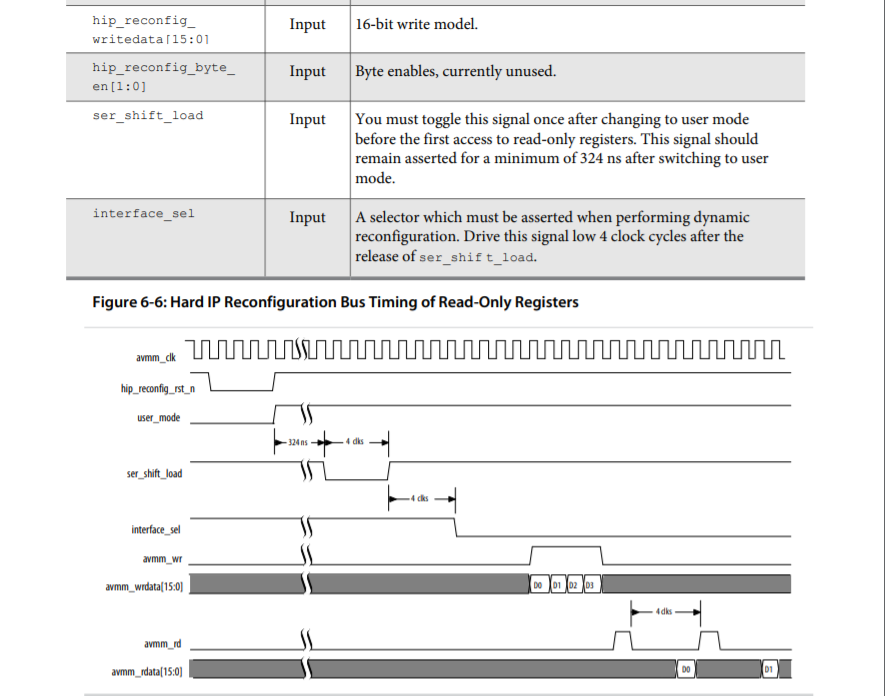
You can use below procedures to dynamically reprogram the register:
1) Bring down the PCIe link by asserting the hip_reconfig_rst_n reset for a few cycles, ser_shift_load and interface_sel stay high during this period. npor is driven low, and stays low throughout the process.
2) After reconfig_rst_n go high (enter user mode), make sure ser_shift_load and interface_sel stay high for 324ns, as per the Figure 34 timing diagram in the A10 user guide.3) After waiting 324ns for PLL to locked, drive ser_shift_load low for 4 cycles, then high, while interface_sel stays high.
4) After 4 more cycles, drive interface_sel low.5) Assert hip_reconfig_write for four cycles, with hip_reconfig_address set to 0, and hip_reconfig_writedata set to 0.
(Write to location 0 of value 0, to enable PCIe reconfig mode. When 0, PCIe reconfig mode is enabled.
When 1, PCIe reconfig mode is disabled and the original read-only register values set in the programming file used to configure the device are restored.)6) Assert hip_reconfig_write for four cycles, with hip_reconfig_address set to 0009h (instead of 0x8A), hip_reconfig_writedata set to the desired new device ID (i.e. 0xb500).
7) Read from register 0009h as the address for device ID.
Expect the device ID after 4 clock cycles. (npor reset signal is released).