Forum Discussion

 Contributor
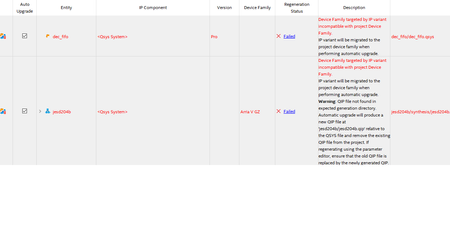
how to handle this ip upgrade failure

 Super Contributor
Just open the Platform Designer system (.qsys file) and regenerate the system in the tool, which will create a new .qip file as noted. Make sure the correct target device is selected in both Quartus and in Platform Designer (Device tab in Standard; set based on the connected .qpf file in Pro).
Platform Designer systems, unfortunately, don't work with the auto upgrade feature here in the IP Upgrade tool. You always have to go into Platform Designer and regenerate them.
 Contributor
by the way, before I update the device to A10, the Standard Edition can compile the old Arria V design without problem. but after I start to update the device to A10, because some qsys can't be automatically update, when I use the Platform designer to open the .qsys, it failed.
Best Regards,


