Forum Discussion

 New Contributor
Customize DSPBuilder-generated custom component in Qsys/Platform designer
 5 years ago
Dear all,
I found a workaround for my problem on my own, thanks to your tips.
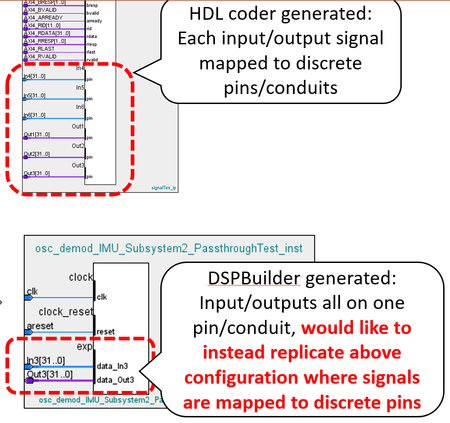
The workaround procedure I developed for configuring DSP Builder-generated custom components to ensure their data signal ports are compatible with connecting to data signal ports on HDL Coder-generated custom components in Platform Designer/Qsys is as follows:
1. Generate _hw.tcl representing contents of DSPBuilder IP core using MATLAB play button.
2. Edit _hw.tcl using any text editor, set EDITABLE property to "true" near top of file
3. Import _hw.tcl into Platform Designer by adding folder containing _hw.tcl and .vhd files to IP catalog search path via Platform Designer top toolbar Tools >> Options.
4. Select DSP Builder IP core (aka custom component), select Edit...
5. Go to Signals & Interfaces tab...- Add one new conduit for each data signal.
- Drag one data signal to each conduit.
- Set clocks and resets for each conduit.
- rename each conduit from [conduit_end1, conduit_end2, ...] to [In1, In2, ... Out1, Out2...] (corresponding to data signal name).
- For each signal, recast "signal type" from [data_In1, data_In2...] all to just "pin".
- Delete original "exp" conduit.
6. Finish, save + overwrite edits, now "port edits" appear at the end of _hw.tcl file.
7. Copy "port edits" at end of _hw.tcl file.
8. Regenerate _hw.tcl file for DSPBuilder IP core using MATLAB play button.
9. Edit _hw.tcl using text editor, add "port edits" to end of _hw.tcl file, replacing "exp" conduit interface declaration.
10. Refresh Platform Designer using F5, add IP core to project. Now data signal conduits are properly configured for connecting to data signal conduits on MATLAB HDL Coder generated blocks, shown below.Thank you to @sstrell for pointing out the easy/repeatable/bug-free way to edit conduit/data signal assignments from the Qsys component editor.
I borrowed this method to generate the _hw.tcl code necessary to define my custom port configuration.
Unfortunately in doing so, the rest of the _hw.tcl file was "wiped clean", but it is easy to regenerate in MATLAB.
I took the port configuration code generated from the component editor, and added it to my re-generated _hw.tcl file, and after refreshing Qsys, the ports on my DSPBA custom component are configured correctly.
Although slightly roundabout, this consistent UI-based procedure seems to work every time. Also, the port configuration _hw.tcl code generated from the component editor is re-usable as long as the DSPBA in/out data signals remain unchanged.

 Super Contributor
I'm not familiar with DSP Builder much, but as far as editing an existing custom component, just right-click the custom component in the IP Catalog and select Edit to open the Component Editor. Then go to the Signals & Interfaces tab. There you can add conduit interfaces and drag and drop the signals around to move them and organize them however you want. Since these are conduit signals and not part of any standard interfaces, you can organize them however you wish. Click Finish to create an updated _hw.tcl file for the component.
I don't know if that helps.
- Ghe0rghe5 years ago
Dear Sstrell,
Thank you for the quick reply, this seems like promising advice.
Unfortunately, after importing a DSPBuilder-generated custom component by including its generated files in the IP Catalog search path, I am unable to select the edit option. Do you know if DSP Builder-generated custom components are write-protected somehow?
If so, how can I disable this write protection, or import these DSP Builder custom components in a way that allows me to edit them after importing?
Best,
- Gheorghe
- sstrell5 years ago
Hmm. Maybe you can manually edit the _hw.tcl file which I assume is generated by DSP Builder (which again I could be wrong about). It's trickier to reorganize signals this way, but if you can edit the _hw.tcl file in a text editor, you should be able to figure it out using the Platform Designer user guide, which describes the commands in _hw.tcl files.
- Ghe0rghe5 years ago
Here is a screenshot of what occurs when I try to edit these DSP Builder generated custom components: it seems like the "Edit" button is grayed out.
Thank you for the tip on editing the _hw.tcl file, I will give that a shot.


