Forum Discussion

 New Contributor
Quartus license not recognized by Quartus

 Super Contributor
Based on my understanding, a time_limited.sof is generated due to license don’t have the Nios II Processor (6AF7 00A2) future. It’s needed a valid license of Nios II to run the build.
can purchase thru distributor. Please find the contact for our sales and distributor near you from link below:
https://www.intel.com/content/www/us/en/partner/where-to-buy/overview.html
Alternative you could apply an Intel 90-Day Evaluation License use with Quartus Pro/Standard. Login to Intel® FPGA Self Service Licensing Center and request the Quartus evaluation free license here https://licensing.intel.com/
1) Go to Sign up for Evaluation or Free licenses
2) Select Intel® FPGA EVALUATION-LIC
3) # of Seats is always 1
4) Check the T&C box
5) Add the required options
6) Click Get License button
The license will be sent to email that you register with
 T24 years ago
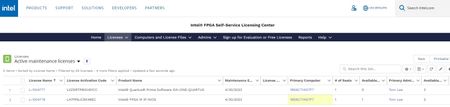
The Nios II license was purchased at the same time as the Quartus license:
When I generated the license I had both licenses selected. Is there another way to get both licenses in the one generated license file?
- T24 years ago
I solved the issue. In the active maintenance license page, even though the Nios license showed the correct primary computer, it was not being generated. I edited the license the Nios license settings primary computer setting to none, then back to my active computer; saved and generated a new license file. Now Quartus generates a .sof that is not time limited.


