Forum Discussion

IDeyn Contributor
7 years agoContributorI/O D1/D3 delay values higher than needed.
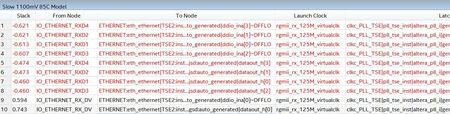
I have a problem, and it could be described like this: there is PHY - to FPGA (Cyclone V) RGMII interface, receive side (for FPGA). Namely I have 125 MHZ, DDR, I use center-aligned mode, I exploi...

IDeynContributor
7 years agoContributorHi Anand!
Ok, thank you very much.
--
Best regards,
Ivan

AnandRaj_S_Intel Regular Contributor
7 years agoRegular ContributorHi ivan,
- Although the Quartus II software configures the delay elements settings automatically. After you have compiled your design, design may/may not meet timing requirements in design, But might still want to skew or deskew some I/O signals in FPGA using delay element.
- The Intel Quartus®Prime software does not automatically set delay elements to maximize slack in the I/O timing analysis. To close the timing or maximize slack, set the delay elements manually in the Intel Quartus Prime settings file (.qsf). set_intance_assignment –to <PIN> -name <INPUT/OUTPUT/OE>_DELAY_CHAIN <0..63>
- If you have compiled design and face timing problems that can be mitigated by setting delay elements manually.
So in example you have shared we have to manually change the delay chain value to constrain the path.
Regards
Anand


