Forum Discussion

 Contributor
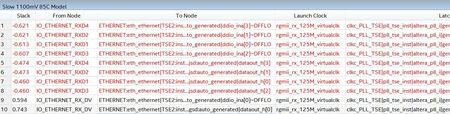
I/O D1/D3 delay values higher than needed.

 Regular Contributor
Hi Ivan,
Thanks for the project, Let me check and come back.
Regards
Anand
 Contributor
Hi Anand!
Ok, thank you very much.
--
Best regards,
Ivan
- IDeyn7 years ago
Hi Anand!
Thank you for your answer.
In my second post I wrote that I can manually set the delays in order to meet timing.
So the question was what is the reason for Quartus engine not to choose delay settings in order to meet timing.
It is strange, isn't it, that Quartus sets the delays so timing fails, but you can manually choose the right values for timing to pass.
And the main part of question was - Quartus almost always chooses right values, except in the project I attached.
The small changes in the project, as I mentioned, lead to right values in delays which Quartus choose.
I thought that maybe it is a bug and our project could be helpful for the team to fix it.
It is strange and probably a bit useless if need to check correctness every time and manually set delays.
In our test project case we can show that Quartus automatically chooses delays which lead to perfect slacks in both setup and hold.
So it is arguably that Quartus chooses delay values and as you said "does not automatically set delay elements to maximize slack".
And I also asked for the root cause of the problem.
--
Best regards,
Ivan
- AnandRaj_S_Intel7 years ago
Hi ivan,
- Although the Quartus II software configures the delay elements settings automatically. After you have compiled your design, design may/may not meet timing requirements in design, But might still want to skew or deskew some I/O signals in FPGA using delay element.
- The Intel Quartus®Prime software does not automatically set delay elements to maximize slack in the I/O timing analysis. To close the timing or maximize slack, set the delay elements manually in the Intel Quartus Prime settings file (.qsf). set_intance_assignment –to <PIN> -name <INPUT/OUTPUT/OE>_DELAY_CHAIN <0..63>
- If you have compiled design and face timing problems that can be mitigated by setting delay elements manually.
So in example you have shared we have to manually change the delay chain value to constrain the path.
Regards
Anand

