Forum Discussion

Altera_Forum Honored Contributor
16 years agoHonored ContributorInsight debugger no showing files
I used to use Quartus 7.1 and we have recently upgraded to Quartus 9.0 (sp2) and the associated software tools.
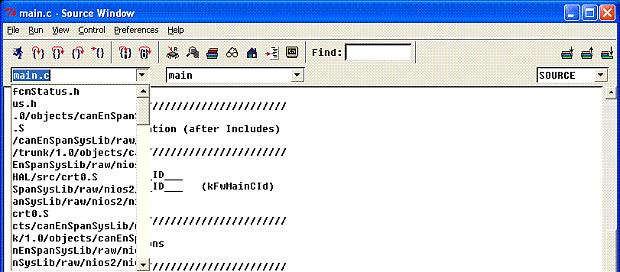
The biggest change that I can see is that they have upgraded gcc from 3.4.1 to 3.4.6. When I run the insight debugger under 9.0, I am not getting a list of files like I used to get when I ran under 7.1 - which makes debugging essentially impossible since I cannot browse my source code to set breakpoints. If I step into code, it finds it, but I cannot browse. The only difference in my setup was upgrading from 7.1 to 9.0, everything else stays the same (compiling the same source, etc) - however in 7.1 when I pull-down the list I get all of the files in my programe. In 9.0, when I pull-down the list of source files, I get a corrupted list (see attached image). Does anyone have any ideas? Adding more information: I installed 7.2 and it behaves just like 9.0, so 7.1 works, but 7.2 fails. 7.1 works even on the files that I built with 7.2, so it doesn't seem to be part of the compiler, but more a part of the debugger - so annoying.2 Replies
 Altera_Forum
Copying 3 files from the 7.1 installer allowed me to get debugging under 9.0
C:\altera\90\quartus\bin\cygwin\bin Added file from 7.1 - cygncurses6.dll C:\altera\90\nios2eds\bin\nios2-gnutools\H-i686-pc-cygwin\bin Replaced file nios2-elf-insight.exe with version from 7.1 C:\altera\90\nios2eds\bin Replaced file nios2-gdb-server.exe with version from 7.1 I attached the files to this in case someone needs to do this and doesn't have the 7.1 file available.- Altera_Forum
I tried a lot of things and nothing that I do allows it to debug correctly under 9.0. However, I did find a few interesting tidbits:
1. In 7.1, the debugger works as expected 2. In 7.2, the debugger fails just like it does in 9.0 3. If I copy nios2-elf-insight.exe from 7.1 to 7.2, it works fine under 7.2 4. If I copy nios2-elf-insight.exe from 7.1 to 9.0, it doesn't launch 5. If I copy nios2-elf-insight.exe from 7.1 9.0 and also copy (under quartus/bin/cygwin/bin) cygncurses5.dll then it does launch and lists all of the files, but it doesn't work.