Forum Discussion

Altera_Forum Honored Contributor
8 years agoHonored ContributorHow to create Separate System in Qsys Under IP Catalog ?
Hi,
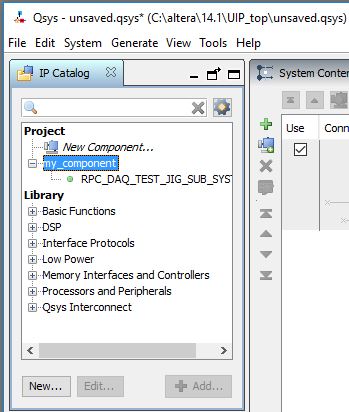
I am using Quartus web edition 14.1 (Free edition) for my trial purposes. I want to know how to create unique IP system in qsys under IP Catalog ? For your reference please find the attachment. Just like i need to create separate system in qsys. Anyone can share me the flow in creating system under IP Catalog of Qsys. Thanks4 Replies
 Altera_Forum
As long as Qsys (now called Platform Designer) can "see" a .qsys file, it gets listed in the IP catalog. For it to see the file, it needs to be in the same directory as the current .qsys, in a directory named ip one level down from the current .qsys file, or in a custom location specified in the tool's options.
- Altera_Forum--- Quote Start --- As long as Qsys (now called Platform Designer) can "see" a .qsys file, it gets listed in the IP catalog. For it to see the file, it needs to be in the same directory as the current .qsys, in a directory named ip one level down from the current .qsys file, or in a custom location specified in the tool's options. --- Quote End --- Sorry, i am unable to get you what you trying to explain me :confused: Please can you explain me step-by-step.
- Altera_Forum
Hi,
Check Intel Quartus Prime Pro Edition Handbook Volume 1 Design and Compilation For “Create IP Components in the Platform Designer Component Editor” from the following link, & check screenshot. https://www.altera.com/documentation/jbr1437426657605.html#mwh1409958782920 Let me know if this has helped resolve the issue you are facing or if you need any further assistance. Best Regards Vikas Jathar Intel Customer Support – Engineering (Under Contract to Intel) - Altera_Forum
There's not much to explain. Where have you placed the .qsys file that you want to appear as a system you can add to another system?
This is called hierarchical system design, so there has to be an already completed system that you are adding as a component in another system.