Forum Discussion

 New Contributor
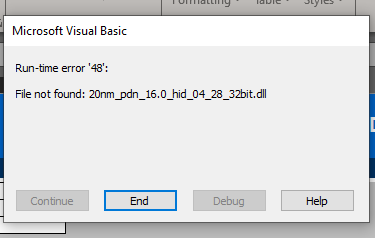
Can't use EPE or PDN with Office 365

 Regular Contributor
Hello,
For your issue can you try these steps to see if it can resolve.
Microsoft has released an update to fix this issue, please go to the corresponding Microsoft Support Page based on your Excel version:
· Excel 2013*: https://support.microsoft.com/en-us/kb/2920754
If the above update doesn't fix the issue, or if you do not have access to these updates, try the following workaround steps:
1. Reboot the computer if you've installed the above update.
2. Close all Microsoft Office applications including the Excel* and Word* applications.
3. Open a Windows* Explorer, and enter "%temp%" (without quotes) into the address bar.
4. Press "Ctrl" + "F" and enter ".exd" (without quotes) into the search box.
5. If any files with extension ".exd" are found, select and delete ALL the files that are found.
6. Next, enter "%appdata%" (without quotes) into the address bar. Again, press "Ctrl" + "F" and search for ".exd", and delete ALL the files that are found.
7. Reopen the EPE.
If the issues remain, follow these steps:
1. Launch the EPE tool, go to File -> Info-> Compatibility Mode, and click Convert.
2. If a pop-up appears, click OK to proceed with conversion, and then click Yes to reopen the workbook.
The previous steps convert the original ".xls" EPE file into a ".xlsm" file. The newly created file should not exhibit the original issue.
Microsoft's description for this issue can be found at:
https://support.microsoft.com/kb/2726958
Hope that helps and do let me know if I can assist you further.
Best regards,
Nazrul Naim


