Forum Discussion

 New Contributor
Aria V Display Port core sometimes disconnected
 New Contributor
Hi,
all of the changes I made to the example design were mandatory:
1. we have no 100M clock available on the board so I had to generate one with current PLL also our DP ref clock is derived from 162MHz so I had to change it as well.
2. the DP Aux channel should be Bidirectional and since our board has no such external IC I had to add it to the example design (unless the Aux channel can be entirely removed some how??)
3. our board has only one lane of Rx DP so I cancel all other lanes - I can add it back but I see no point.
I can revert back to 5.4G if you think it may help.
I'm not sure what did you mean by:
- But now you need to watch out on all the clock frequency that you supply to DP design.
Please explain
I tried to get a BER report from the NIOS command shell by typing nios2-terminal as you suggested but then the command line was locked to further typing (please see attached image) I verify the USB bluster is detected properly in the device manager (please see attached image)
Please advise how can we proceed?
Thanks
Ariel
New ContributorHi,
I got some assistent from a local SW FAE on how to properly load the NIOS2 processor, however it did not work out on our boards.
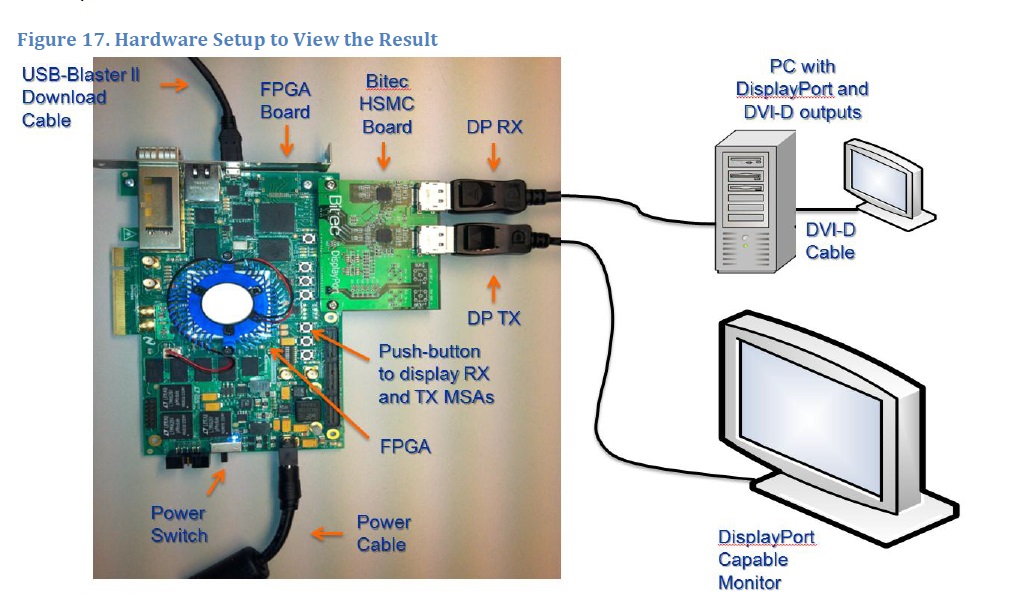
So I managed to get an Arria V evaluation board and a bitech doughter display port extender . I connected the evaluation board Rx to my docking display port output and the evaluation board Tx to my monitor(see photo).
When power up the board my windows 10 detect a new monitor on the display settings and during the SOF and .ELF load I got file transfer positive feedback (those werethe genuin files from the example design), however after I type: NIOS2-terminal I got no response and S or s command are not recognized then the new monitor detection was disappear. I also opened a secondary NIOS2 command shell to read NIOS messages but noting was printed. (see shell print capture)
Please advise how can we proceed?
Thanks
Ariel Saar