Forum Discussion

 New Contributor
JTAG pin connections for MAX 10 FPGA

 Super Contributor
In the Pin Planner, choose to view the Legend from the View menu. This explains all the symbols and colors on the pins, including highlighting the JTAG pins, so you can find the pins for your device. You can also download pin files from the Intel web site, but I find it easier to see them directly in Pin Planner.
 New Contributor
I am not sure, where this pin planner and legend if at. Maybe it is in different software.
I am using altium to design the board.
Below is the jtag connector header.
I am confused in connecting these JTAG J161A nd J161B pins to which pins of FPGA(10M08SAE144C8G).
Please help me with just these 10 connections of JTAG.
- sstrell2 years agoIn Quartus, use the Pin Planner from the Assignments menu.
- Sathvika2 years ago
Thanks for your help. I just installed quartus, but the pins I have from jtag are not matching with all the FPGA JTAG pins. Is there a way to meet over webex to discuss in 10min? It would be really helpful to close this item quickly if we do so.
- Sathvika2 years ago
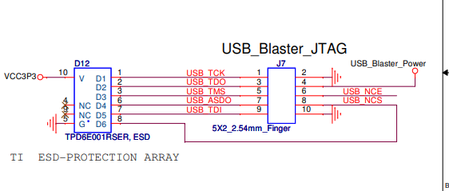
From the usb blaster there are 10 pins coming out like below.
But in these 10 pins, TCK, TDO, TMS, TDI are going to FPGA according to quartus pin planner. What to do with other pins coming from USB blaster?


