Forum Discussion

 New Contributor
How to run modelSim
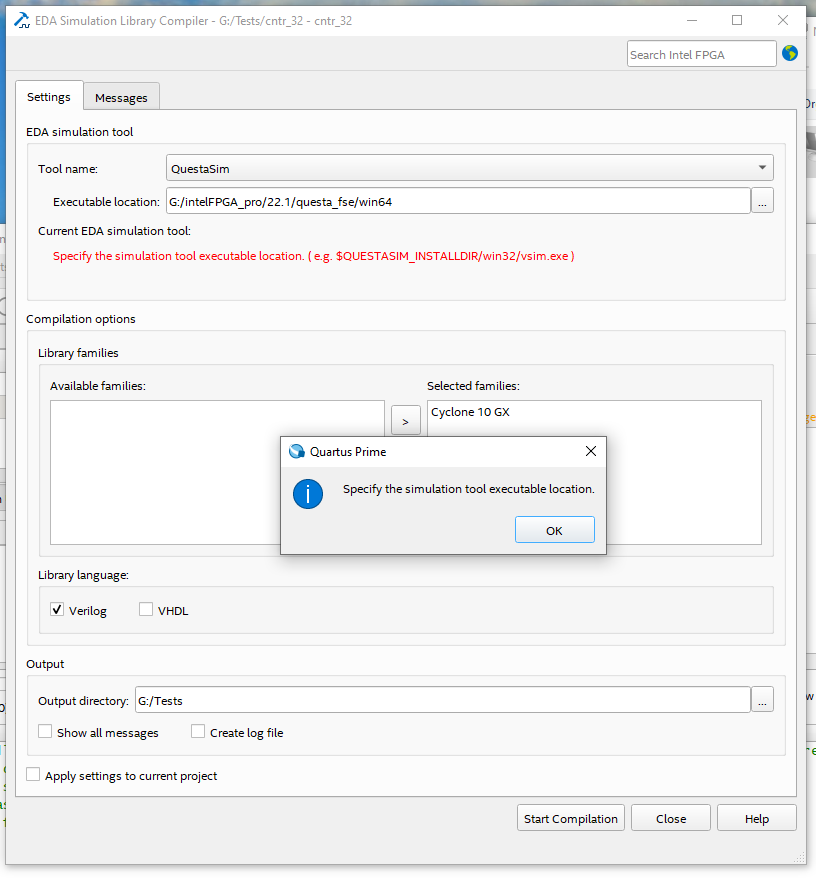
I have just installed the Intel Quartus Prime Pro edition. I have followed one of the videos on a simple design and my local installation could not find vsim.exe. Attached the screen of failure.
Note: vsim.exe does exists in the following path,
G:\intelFPGA_pro\22.1\questa_fse\win64
Please advise to how to move forward.
Thanks,
Ali
10 Replies
 SyafieqS
Super Contributor
Hi Ali,
You should specify the application. e.g.
G:/intelFPGA_pro/22.1/questa_fse/win64/vsim.exe
 AliB
AliB
- sstrell
In your first post, you had it set to ModelSim instead of QuestaSim, causing the error. In your last post, you have the tool set correctly as QuestaSim, but you put the executable itself in the location field. It should just be the win64 directory to get rid of the error.
- AliB
- sstrell
Does Questasim start OK if you manually run vsim.exe?
- AliB
No, It has a licensing issue.
I have already filed a request "Full License for Quartus Prime Pro Edition"
to resolve the issue. Not much of traction on this request.
I appreciate if you could lead me to expedite the process.
Screen shot for running vsim.exe manually.
- SyafieqS
Ali,
Seem this issue related to licensing, I suggest you to open new forum case for expedite process. Someone with the resources will be able to help you.
- SyafieqS
Let me know if there is any concern on this.
- SyafieqS
We do not receive any response from you to the previous reply that I have provided, thus I will put this case to close pending. Please post a response in the next 15 days to allow me to continue to support you. After 15 days, this thread will be transitioned to community support. The community users will be able to help you with your follow-up questions.
- AliB
Hi,
I have installed a license as suggested and the process is going further but I still have a problem compile and simulate with vsim.exe and the issues is still a license issue.
I am running Intel Quartus Prime Pro Edition on window 10.
I have created a license and saved it in /licenses/flexlm directory
I have set the system variables, SALT_LICENSE_SERVER, MGLS_LICENSE_FILE, LM_LICENSE_FILE to the path of the license. I ran "Launch Simulation Library Compiler". Compilation failed due to checking out license for vsim as shown below,
Here is the output of the compilation,
"Info: Start compiling process
Info: Args: -tool modelsim -language verilog -tool_path G:/intelFPGA_pro/22.1/questa_fse/win64 -directory G:/Tests/cntr_32_sync -rtl_only
Info: *******************************************************************
Info: Running Quartus Prime Shell
Info: Version 22.1.0 Build 174 03/30/2022 SC Pro Edition
Info: Copyright (C) 2022 Intel Corporation. All rights reserved.
Info: Your use of Intel Corporation's design tools, logic functions
Info: and other software and tools, and any partner logic
Info: functions, and any output files from any of the foregoing
Info: (including device programming or simulation files), and any
Info: associated documentation or information are expressly subject
Info: to the terms and conditions of the Intel Program License
Info: Subscription Agreement, the Intel Quartus Prime License Agreement,
Info: the Intel FPGA IP License Agreement, or other applicable license
Info: agreement, including, without limitation, that your use is for
Info: the sole purpose of programming logic devices manufactured by
Info: Intel and sold by Intel or its authorized distributors. Please
Info: refer to the applicable agreement for further details, at
Info: https://fpgasoftware.intel.com/eula.
Info: Processing started: Wed Jul 6 22:04:26 2022
Info: System process ID: 12532
Info: Command: quartus_sh --simlib_comp -tool modelsim -language verilog -tool_path G:/intelFPGA_pro/22.1/questa_fse/win64 -directory G:/Tests/cntr_32_sync -rtl_only
Info: Quartus(args): -tool modelsim -language verilog -tool_path G:/intelFPGA_pro/22.1/questa_fse/win64 -directory G:/Tests/cntr_32_sync -rtl_only
Info: Changing the current directory to output directory G:/Tests/cntr_32_sync ..
Info: Using Path G:/intelFPGA_pro/22.1/questa_fse/win64 that was set in EDA Simulation Library Compiler Options
Info: Generating commands to compile library altera_ver ...
Info: Generating commands to compile library lpm_ver ...
Info: Generating commands to compile library sgate_ver ...
Info: Generating commands to compile library altera_mf_ver ...
Info: Generating commands to compile library altera_lnsim_ver ...
Info: Executing command file containing library compilation commands
Info: Unable to checkout a license. Make sure your license file environment variable (SALT_LICENSE_SERVER, MGLS_LICENSE_FILE, LM_LICENSE_FILE)
Info: is set correctly and then run 'lmutil lmdiag' to diagnose the problem.
Info: Unable to checkout a license. Vsim is closing.
Error: ** Error: Invalid license environment. Application closing.
Error: Compilation was NOT successful. 1 errors, 0 warnings"
Any idea to fix this failure and move forward with simulation.
Thanks,
Ali