Forum Discussion

 Occasional Contributor
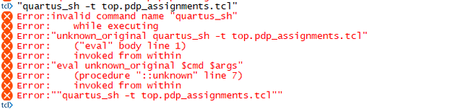
Error with "quartus_sh" command after interface planner
 3 years ago
Have you set your PATH environment variable to the bin directory of your quartus? Try this and then re-run
Considering you're using Linux:
export PATH=$PATH:<installed_quartus_directory>/<version>/quartus/bin
On Window
1) Open up your command prompt (cmd)
2) Type set PATH=%PATH%;C:\altera\12.1\quartus\bin
Change the back party of the PATH after ';' according to your quartus installation directory
Then try to run quartus_sh again
Similar issue found out that might be helping.
 Super Contributor
I’m glad that your question has been addressed, I now transition this thread to community support. If you have a new question, Please login to https://supporttickets.intel.com/, view details of the desire request, and post a feed/response within the next 15 days to allow me to continue to support you. After 15 days, this thread will be transitioned to community support. The community users will be able to help you on your follow-up questions.
p/s: If any answer from community or Intel support are helpful, please feel free to mark as solution, give Kudos and rate 5/5 survey


