Forum Discussion

 Occasional Contributor
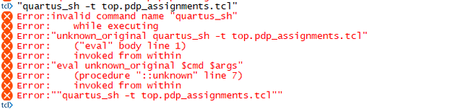
Error with "quartus_sh" command after interface planner
 3 years ago
Have you set your PATH environment variable to the bin directory of your quartus? Try this and then re-run
Considering you're using Linux:
export PATH=$PATH:<installed_quartus_directory>/<version>/quartus/bin
On Window
1) Open up your command prompt (cmd)
2) Type set PATH=%PATH%;C:\altera\12.1\quartus\bin
Change the back party of the PATH after ';' according to your quartus installation directory
Then try to run quartus_sh again
Similar issue found out that might be helping.
 Super Contributor
Have you set your PATH environment variable to the bin directory of your quartus? Try this and then re-run
Considering you're using Linux:
export PATH=$PATH:<installed_quartus_directory>/<version>/quartus/bin
On Window
1) Open up your command prompt (cmd)
2) Type set PATH=%PATH%;C:\altera\12.1\quartus\bin
Change the back party of the PATH after ';' according to your quartus installation directory
Then try to run quartus_sh again
Similar issue found out that might be helping.
 Occasional Contributor
Hi SyafieqS,
Thank you for your reply.
I could run the generated tcl file with the following add-on window.
Thank you for your help.
Best Regards,
Junyong


