Forum Discussion

 Contributor
DDR4 compile conflict with existing constrains
 4 years ago
Hi David,
I can see the alert_n pin that you disabled.
Actually the alert_n pin configuration is in the EMIF IP.
When you open the EMIF IP in IP Parameter Editor, under the Memory tab, in Topology section, there is a ALERT# pin placement option.
The EMIF IP will reserve the location that you have set for the alert_n pin.
In your project, I can see that you set it to I/O Lane with DQS Group 0.
So the pin location should be in the Bank 2L where there is your DQS Group 0 - 3.
Because the alert_n pin is not been set by the user, the Quartus will set it for you.
In this case, I can see that the Quartus has set it to pin C28.
So now you can change the pin location from E35 to C28 or just let the Quartus set it for you.
I generate the .tcl file from the Pin Planner in case you want to refer the pin location that have been changed.
But I also share the .qsf file to ease your work.
Don't worry on how to use it.
It's just for reference purpose.
I'm sorry for confusing you.
Please let me know if you're still having trouble with it.
Thanks,
Adzim
 Regular Contributor
Hi David,
I think that the ALERT pin is special pin for the DDR4 interface.
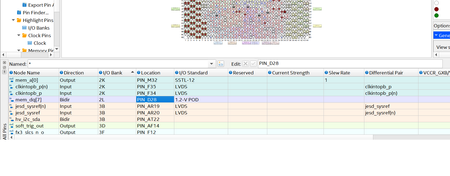
Even if the pin is not assigned by the user, the pin will be assigned by the Quartus as shown in image below.
The Quartus will fit the location for the signal for you.
If you want to use the pin E35, you must change the setting in EMIF IP for ALERT pin location.
As you can in the image below, the setting is set to Address/Command lane 0 with pin no. 8.
This location is also same as pin E35.
But the location is already been used by other signal.
So the ALERT pin location will be determined in this EMIF IP setting and you should aware of where you should assign the pin.
Thanks for posting your question in Intel Community.
Regards,
Adzim
 dsun014 years ago
Hi Adzim,
on the Intel A10 GX dev board, the ALERT pin from Hilo memory card is physically connected to Arria 10 Pin E35. so I don't think use other pins is an option.
I create a new IP from scratch by using presets for emif_0 Arria 10 GX FPGA Development Kit with DDR4 HILO. there should not have any other assignment.
why it report
Error: emif_0.arch: Cannot place ALERT# at pin 8 of A/C lane 0 since it is already occupied by another A/C pin.
to isolate the possible wrong assignment or resource conflict in my project. why the original Intel preset IP still have the Alter# error. I think alter# has to be assigned to E35.
thank you,
David
- dsun014 years ago
Hi Adzim
After I played with the Platform Designer, I think I figured out my problem, if I create an example from original 72 bit IP. everything is OK, the pin will be put on the E35 by default, and compile no problem, but when I change it to 64 bits( because the original design from Texas Instrument is 64 bits). then the Platform Designer will complain that
Error: emif_0: "DQS group of ALERT#" (MEM_DDR4_ALERT_N_DQS_GROUP) 8 is out of range: 0, 1, 2, 3, 4, 5, 6, 7
it is reasonable to remove the 9th group. but I guess the Alert# is bundled with this DQS group 8 is the one that connected to the E35.
That is my problem, If to fix from the Platform Designer side is too complicated. I will instantiate a 72 bit emif bus, and from the project level, unconnect (disable) the top 8 bits. hope it will work.
thank you for help.
David
- dsun014 years ago
Hi Adzim,
Now I have another headache. the whole project I am porting to the Intel A10 GX dev board is based on 64 bit DDR4.
if I use the preset DDR4 HiLO 72 bits, then I have to change all the MM bus of the project from 512 to 576( DDR X 8).
if I change preset DDR4 HiLO to 64 bits, then the Alert# won't be able to assign to Pin_E35. I am not that familiar with the DDR4 standard, is this Alert# very critical? can I ignore it when prototype with the Dev Kit, and make the fix in the final production board design?
thank you,
David


