Forum Discussion

manishkumar New Contributor
2 years agoNew ContributorCyclone® V FPGA – Remote System Upgrade over UART Based on Nios® II Processors with EPCQ Design Exam
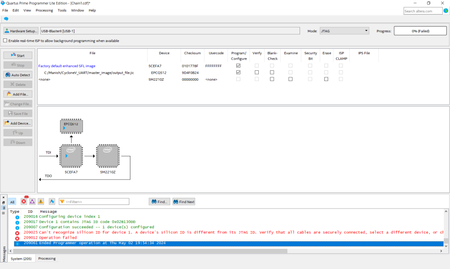
with given reference design example try to program the output_file.jic file through Quartus prime programmer as per the reference user manual in to the (Cyclone V E FPGA Development Kit) , but it is...

NurAiman_M_Intel Super Contributor
2 years agoSuper ContributorHi,
- Do you have another USB blaster II? Can you try with another USB blaster II?
- Try to lower the TCK frequency to 6MHz.
- Try with different Quartus version.
Regards,
Aiman

manishkumarNew Contributor
2 years agoNew ContributorHi,
1) tried with USB blaster II
2) Also tried with changing the JTAG Tck frequency from 24Mhz to 6 Mhz.
3) tried with Quartus version 18.1, 20.1, 23.1
still silicon id mismatch error is coming. Kindly provide the assistance to access the Flash
Regards
Manish


