Forum Discussion

 New Contributor
Arria 10 GX Development Kit BTS Failure (Claim slave service failed!)
Hello,
I have Arria 10 GX development kit with serial number 10APCIe0004683 and want to verify some peripherals using Board Test System (BTS). I downloaded Arria® 10 GX FPGA Development Kit (Production Edition) installer package (V22.4) using Intel website.
Quartus Prime Std 23.1 is installed on my PC and it was open during my work with BTS GUI.
Before working on BTS GUI, I checked silicon type which is PRD for my device. Then, I followed the instructions mentioned in Intel Arria 10 GX FPGA Development Kit Quick Start Guide (page 2 and 3) to upload corresponding .flash file. I observed that I uploaded proper .flash file which is located in the following datapath (..\arria10GX_10ax115sf45_fpga_v22.4.0_v1.1\factory_recovery\build_factory_source\PRD\bts_config.flash)
To reconfigure the FPGA with new files, I pressed S5 push button until LED D13 illuminates and then S6 push button. Then, I powered off the board and set SW6.4 to OFF. After this, I powered on the board and double clicked the BoardTestSystem.bat (in ..\arria10GX_10ax115sf45_fpga_v22.4.0_v1.1\examples\board_test_system datapath).
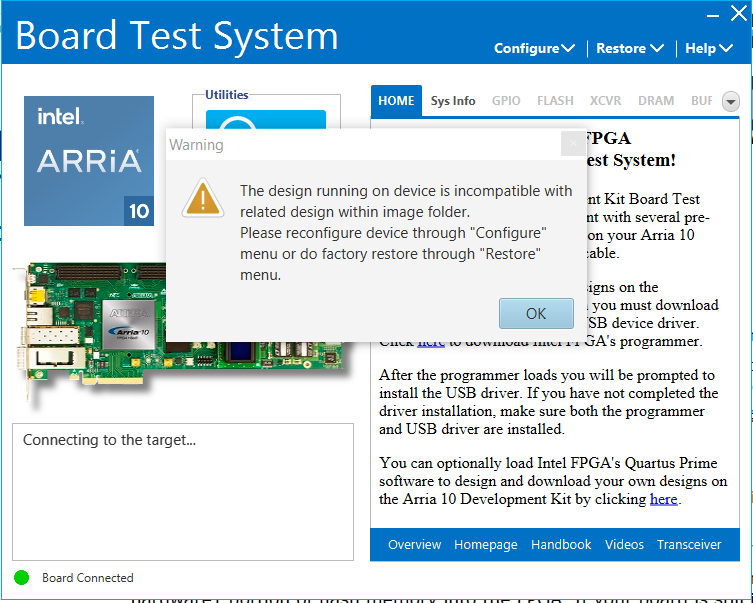
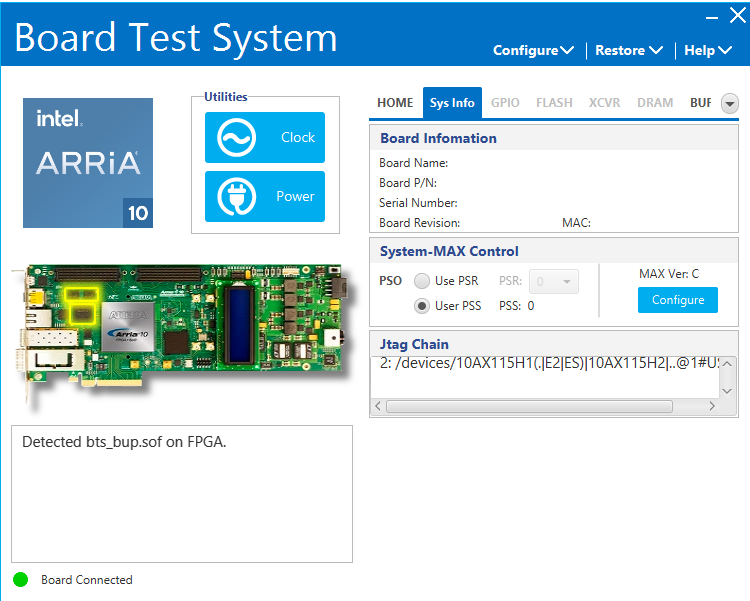
During my work on BTS GUI I had several warnings and errors which can be seen in attachments. I am not able to configure any test excluding BUP Design. I tried to close GUI and restart it. However, it did not work. In Sys Info tab, Board Information section of BTS GUI does not include any information related to device. I am looking forward your support to verify my development kit. I attached bts_log.txt file and in line 59 the error that I got can be seen (Claim slave service failed!).
Thanks in advance.
7 Replies
 Alpay
AlpayHello,
My problem still exists. I appreciate to learn the solution if anyone faced with same problem and fixed it.
Regards, SantiagoBettig
Hi Alpay!
I'm having the same issue doing those steps.Currently using Quartus Prime Std 23.1 and i think the problem is related with the Quartus version.
Did you fixed it somehow?
- Alpay
Hi Santiago!
Unfortunately I have not fixed the issue yet.
Since I have license for only Quartus Prime Standard software and BTS GUI requires Quartus version 22.4 or above, there are two possible options. I could not fix the issue using Quartus Prime Std v23.1.1 too.
Have you tried to use Quartus Prime Std v23.1.1?
- Alpay
Hello,
Intel team confirmed that Quartus Pro Edition is needed to run BTS of Arria 10 GX devkit. Then, I successfully ran BTS with Quartus Prime Pro 22.4 and performed tests without a failure.
The tricky part is embedding .sof file of corresponding test using Quartus Programmer. So, I stopped to use BTS GUI every time when I wanted to switch from one test to another and embedded a new .sof file using Programmer GUI. It was the only way to perform tests successfully.
I hope this might help other people who face the same problem. - SantiagoBettig
Hey Alpay , thanks for replay!
I really apreciate your help. We tested it with the Quartus Prime Pro and it works fine now.
Best Regards
- Alpay
Hello Santiago,
It is good to hear that it helped you.
Kind Regards
 FakhrulA_altera
Regular Contributor
Hi Alpay,
Glad to hear your issue has been resolved. BTW, we sincerely apologize for the inconvenience caused by the delay in addressing your Forum queries. Due to an unexpected back-end issue in our system, your Forum cases, along with others, did not get through as intended. As a result, we have a backlog of cases that we are currently working through one by one.
Please be assured that we are doing everything we can to resolve this issue as quickly as possible. However, this process will take some time, and we kindly ask for your patience and understanding during this period. The cases will be attended by AE shortly.
We appreciate your patience and understanding, and we are committed to providing you with the best support possible.
Thank you for your understanding.