Forum Discussion

 Occasional Contributor
Agilex 7 AGIB027R29A1E2VC board QSFP-DD issue

 Community Manager
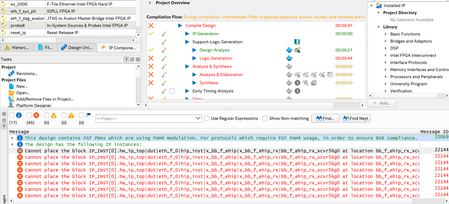
The root cause is a well-documented FGT Quad0 PAM4 data-rate restriction.
Why Port B (Q2/Q3) compiles and Port A (Q0/Q1) does not
FGT Quad1, Quad2, and Quad3 can support 20–58 Gbps PAM4. F-Tile Ethernet Hard IP User Guide However, FGT Quad0 can only support 20–32 Gbps PAM4. F-Tile Ethernet Hard IP User Guide
Your 4×50G PAM4 configuration runs each lane at 53.125 Gbps. That rate is legal on Quad1, Quad2, and Quad3, but it exceeds Quad0's 32 Gbps PAM4 ceiling. When the Fitter tries to place the bb_f_ehip_rx_xcvr56g0 hard-IP blocks onto Q0 channels, it fails with Error 22144 because the requested rate is out of range for that quad.
Port B is wired to Q2 and Q3 — both of which fully support 53.125 Gbps PAM4 — so its placement succeeds without issue.
Fix
You have two practical options:
- Restrict Port A placement to Q1 only. Port A physically spans Q0 and Q1, but Q1 alone provides four channels and fully supports 50G PAM4. In your .qsf, constrain all four 50G PAM4 lanes to Q1 pin locations and leave Q0 unassigned (or preserve it). This is the most direct fix without any hardware change.
- Use a data rate compatible with Quad0 on those channels. If you genuinely need to use Q0 pins (e.g., for board routing reasons), you must drop to ≤32 Gbps PAM4 per lane on those channels — for example, 4×25G PAM4 (25.78125 Gbps). 50G PAM4 on Q0 is simply not placeable regardless of IP or software version.
Also, use the F-Tile Channel Placement Tool for your channel placement planning, and use the Quartus Prime Tile Interface Planner to sign off on the channel placement for your board layout. F-Tile Architecture and PMA and FEC Direct PHY IP User Guide
In short: move all four Port A 50G PAM4 lane assignments to Q1 pins in your .qsf, and the placement error will clear.
Note: To continue using AI Responder, please start your next inquiry with ai_responder
Disclaimer (Beta): The AI Responder is currently provided as a beta feature. AI-generated responses may contain errors or omissions. Please verify technical guidance with official Altera documentation before implementation.
Thank you very much.


