User Profile

corestar
 Contributor
Joined 8 years ago


User Widgets
Contributions
Re: Can an Application Ignore PCIe flow Control Credits?
Hello VenT_Altera That gives me all the info I needed. It seems to work very reliably by just handling the tx_st_ready. I would suggest they change the wording of: Note: You must keep track of the credits consumed by the Application Layer. to Note: If you want to optimize packet ordering, you must keep track of the credits consumed by the Application Layer. Thanks, Dave9Views0likes1CommentRe: How to handle tx_st_ready for Cyclone V PCIe
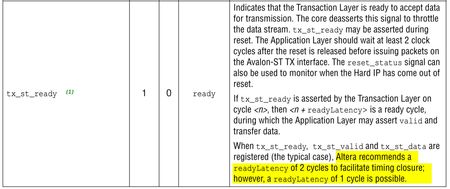
Hello VenT_Altera , Sorry for the late response; we're on Holiday here. I've implemented timing as per the diagrams and it seems to work, but I always like to understand things. I think what was confusing me is the statement that the readyLatency is two clock cycles: I think what they mean to say is the readyLatency is up to two clock cycles. Is the following a valid way to look at things: The PCI core always accepts data when tx_st_valid is high. However, it tx_st_ready goes low, you must deassert tx_st_valid within two clock clock cycles and not reassert until at least one clock cycle after tx_st_ready goes high again. Regards, Dave13Views0likes1CommentCan an Application Ignore PCIe flow Control Credits?
I'm using a Cyclone V GT with PCIe core using Gen 1 Avalon-ST 64-bit endpoint interface. Occasionally packet sending would stall and I had thought it was because I was ignoring the flow control credits. But after properly handling tx_st_ready going low, the problem seems to have gone away. So the question is can I ignore the flow control signals as long as I throttle the sending when tx_st_ready goes low? In the flow control section of the UG-011110 dated 2020.06.02, it says That is not important for our application. But then after spending several paragraphs explaining how the PCIe Hard IP tracks and checks credits, it make says: Can I assume that is only in the case described in the yellow highlight? Also, in the flow control update loop description, is says: Is that where the Hard IP is lowering tx_st_ready so the App is indirectly handling credits? If so, one odd thing is that sometimes tx_st_ready does not go low until toward the end of a packet write (ie closer to the EOP and the SOP). I would think it would do the credit check as soon as it had the TLP headers which contain the type, number of dwords etc. Just a suggestion, but for Apps that did want to optimize throughput, it would have been helpful to just expose the credit limits to the App instead of making it independently keep track of them. The credit system is a bit confusing.Solved94Views0likes5CommentsRe: How to handle tx_st_ready for Cyclone V PCIe
Hello VenT_Altera Thanks for the update. Maybe a better way to phrase my question is are the signals in the timing diagrams (ie tx_st_ready, tx_st_valid etc ) the ones directly coming out of the core or ones externally registered by the user? Again, the way it is worded makes it sound like the user has some control over the readyLatency, but nothing in the core generator allows me to select that. I've gone ahead and implemented it assuming readyLatency = 2 and the signals are from the core and it seems to work. But it would be nice to know for sure. Thanks, Dave39Views0likes3CommentsHow to handle tx_st_ready for Cyclone V PCIe
I'm using a Cyclone V GT with PCIe core using Gen 1 Avalon-ST 64-bit endpoint interface. Everything works pretty well including sending and receiving data, DMA transfers etc. But so far I've ignored the situation where tx_st_ready is deasserted during a packet transmission. Time to deal with it, but the docs are a bit confusing. For example, the following implies I have some sort of control over the readyLatency, but I see nothing in the core generator to set that. How to I know what the readyLatency is? And what to they mean the "typical case"? In the above, are they saying I should register them? I see nothing in the core generator to say if they should be registered or not. They give a timing diagram below which is a bit confusing.Solved128Views0likes7CommentsRe: Fitter stalls on "Advanced Physical Optimization" on Windows 10
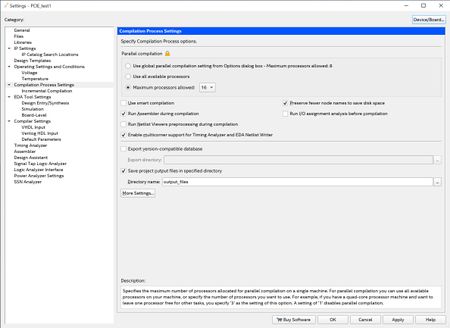
ShengN_altera thanks for the help. When you say Quartus does not work well with SMT, do you mean Hyper-Threading in general or is there some specific bug in AMD SMT? Note, the other engineers who successfully compiled this program were on 8 core AMD Ryzen machines with SMT enabled. So SMT alone is clearly not the issue; it must be a combination of number of cores and SMT. I tend to agree with FvM that if Quartus cannot handle certain configurations then it should at least detect it and produce an error message (eg "Disable SMT to run Advanced Physical Optimization"). As near as I can tell, SMT/Hyper-threading is completely transparent to software. I suspect somewhere in the internals of Quartus someone 20 years ago hardwired and array to say 16 cores (alot at the time) and it just needs updated. But thanks again. It's not an ideal solution, but at least I can run.61Views0likes1CommentRe: Fitter stalls on "Advanced Physical Optimization" on Windows 10
Hello ShengN_altera , That worked! I did not realize "SMT" was AMD's term for Hyper-threading. Still not clear why it caused a problem. It is supposedly transparent to user programs. I went into the BIOS: Advanced\AMD CBS\CPU Common Options\Thread Enablement and changed SMD Control to disabled. It now completes the compile. Hopefully it will not affect other programs, but at least I have a solution. Hyper-threading is probably a waste of time on a 64 core system anyway.79Views0likes5CommentsRe: Fitter stalls on "Advanced Physical Optimization" on Windows 10
Hello ShengN_altera It's not a laptop. It is a desktop computer with AMD Threadripper Pro 3995WX processor with 64 cores and an Asus Pro WS WRX80E-SAGE motherboard with 512GB RAM. It is running Windows 10 Pro. But I don't know what you mean by is it multi-thread or single-thread.82Views0likes0Comments