User Profile

jaxbir267
 New Contributor
Joined 2 years ago


User Widgets
Contributions
Re: How to verify timing for Agilex DDR4 Post Layout
Please provide guidance on how Intel recommends to perform timing closure analysis. I thought I would be able to use their DDRx Batch Mode Wizard but it is seeming increasingly that this is not what Intel intended. I've now got SPICE models that are supposed to help me perform the timing Analysis, but the DDR simulation tool in Hyperlynx doesn't require SPICE models in order to run. Additionally I now have a .dat file that has timing spec information but don't know where to apply that either I am new to this and am not finding sufficient guidance on how to verify my design based on the Design Guideline.751Views0likes0CommentsRe: How to verify timing for Agilex DDR4 Post Layout
Hi, I am using an F-series Agilex part. The DDR4 will be running off both Fabric and HPS pins. That being said I have run into the timing closure chapter before but didn't find it useful particularly because I did not know how to export my design to touchstone file. After your response I have investigated further and found that Hyperlynx does export S-parameter files (yay!) but still need to investigate how to do it properly. Is there help on doing this? I was hoping a .v file could be generated directly from the Quartus EMIF IP because that would allow me to do the timing analysis within Hyperlynx with their DDR analysis tool.784Views0likes0CommentsHow to verify timing for Agilex DDR4 Post Layout
Hello, How do I verify that my layout is meeting timing requirements with Agilex 7 and a Quartus Prime Pro 24.1.0.115. I am trying to verify that a DDR4 design meets timing requirements post-layout in Hyperlynx. I'm using an Agilex 7 and am not able to find anything in Quartus/EMIF User Guides that provide evidence that I'm able to do this accurately. It appears that Intel no longer supports designers ability to do this as I'm not seeing evidence of a) Quartus exporting a timing report .v file nor do they b) import board characteristics (i.e skew/propagation delay) in the EMIF IP for timing analysis. I am a novice at using Quartus so maybe I'm just missing something, any assistance is appreciated!Solved977Views0likes4CommentsRe: Can't use EPE or PDN with Office 365
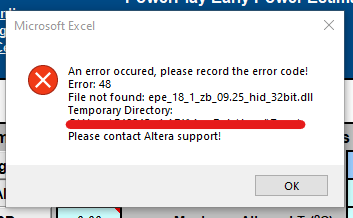
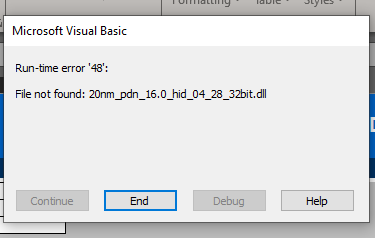
I'm trying to use PDN for Max10: https://www.intel.com/content/www/us/en/content-details/652727/power-delivery-network-pdn-tool-for-intel-max-10-devices.html which is the file giving the error I screenshotted above... upon opening the file and when I trying to change the family. I also am trying to use the Max10 EPE: https://www.intel.com/content/www/us/en/content-details/652727/power-delivery-network-pdn-tool-for-intel-max-10-devices.html which is giving me the same error I can ignore the errors and try pressing buttons, but the buttons then have no effect. And when I try to manipulate values in the spreadsheet the report/calculations aren't appropriately updated. These are the files sizes: I do have have to enable editing after downloading the files, but the files don't actually seem corrupted/changed by my downloading them.1.2KViews0likes1Comment