User Profile

Paba
 New Contributor
Joined 3 years ago


User Widgets
Contributions
Re: Intel HLS compiler is hanging during compilation
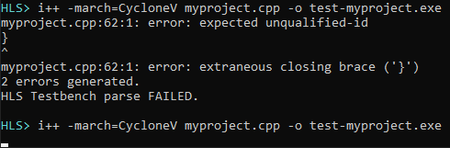
Dear @BoonBengT_Altera I was finally able to continoue on the project and followed your advices. Here is the result: I have transferred my project into a VisualStudio 2022 project solution. Like this I was able to debug the project more in detail. As already stated by you, there were some conflicts with the braces. But in the end the project compiled successfully. There were two things I've noticed during compilation with Visual Studio: Some includes had to be added manually to the project. I don't know how this is done during HLS compilation and how the HLS compiler knows about the includes. However, they are all located in the 'src' folder and should be accessible for the compiler. I had to set a flag for the compiler for a big project. In my first attempt to compile the project, the compiler complained about the size of the obj file and did not finish the job successfully. Only after the flag was set the compiler run through and in the end generated an obj file of about 250MB size. During my first attempt with the HLS compiler, it still claimed an issue with the braces. The compiler this time printed the error message and stopped working. I was not sure if the HLS compiler got confused by the #ifndef statements in the myproject.cpp file, because the claimed braces were placed within these #ifndef statements. Therefore, I did remove them completely because they are not necessarily needed for a first test run. After that the HLS compiler started to work. But I ended up in the same situation as before: The HLS compiler runs forever without returning any message. I assume that there is no project issue at the moment since the project was compilable in VisualStudio. For your reference, I zipped the complete VisualStudio solution again and attached it to this post. Maybe you see more than I do and there still is something wrong in my project. But so far I don't see anything that could be wrong in the project.2KViews0likes0CommentsRe: Intel HLS compiler is hanging during compilation
Hi BoonBeng Thank you a lot for your hints in regards of my project. So far I didn't have time to take a look into it and with my longer holiday now waiting for me, it still will take some time. The includes I am using are referring to other, standard libraries. I guess it then will take me again some time to find out what the issue is. I will definitively come back to you again as soon as I have more information. But this won't happen before October.2.1KViews0likes0CommentsRe: Intel HLS compiler is hanging during compilation
Hi BB Thanks for your response! I'm not sure what you mean with the emulation compilation. Can you quickly explain what you mean with it? However, I have attached the project I try to compile as a zip file to this comment. Maybe you can find out more than me. At least the log files did not show any errors. Therefore it is hard for me to say if there was an issue with the file and what could have caused the hanger. Best Regards Paba2.4KViews0likes0CommentsIntel HLS compiler is hanging during compilation
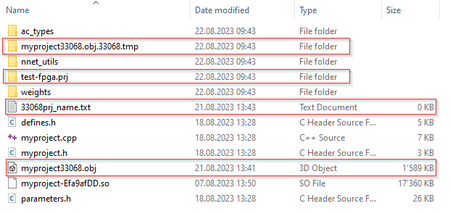
Hi all I finally managed to get my HLS compiler working and already successfully compiled one of the example projects. So I gave it a try with my own design. First it looked good. The compiler started to build up the file structure in my folder: Also inside the project folder it started to create the files: But after the compiler was still working after 10 minutes, I checked the folders again if something happened. The files still looked the same! So I thought maybe I'm just impatient and let it run over lunch. Even after 3 hours, the compiler still did not finish and also the files in the folders did not change. So I decided to stop and repeat it. Still the same. The compiler stays in the following condition for hours: There was no error returned by the compiler. Also the log files did not contain any information. Is it really possible that the process takes this long? Does anyone have a hint how to debug this or what could be wrong on my side? I am using the following setup: Intel Quartus 22.1 Intel HLS compiler 21.4 Microsoft Visual Studio Professional 20172.5KViews0likes9CommentsRe: Intel HLS compiler does not find includes
Hi Aik Thanks for your time and the attempts to help me. Finally I found out what the problem is and it is going in a completely different direction than you tried to help. Unfortunately I must say the Intel documentation for the HLS compiler has a lot of room for improvement! The problem on my side was at different locations: I had to install the latest Quartus version. I was not able to get it run with Quartus 18.1 which I am currently using. I had to download the latest HLS compiler 21.4. The one which comes with Quartus 18.1 does not work on my computer. I was still not able to correctly run the init_hls.bat file. I was using Windows Power Shell as the command prompt, but this is not working. You need to use the normal command prompt to get it run. However, in the end the following link helped me a lot to solve the problem: https://www.macnica.co.jp/en/business/semiconductor/articles/intel/127029/ Best Regards Paba2.5KViews0likes0CommentsRe: Intel HLS compiler does not find includes
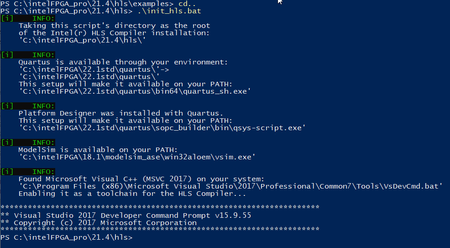
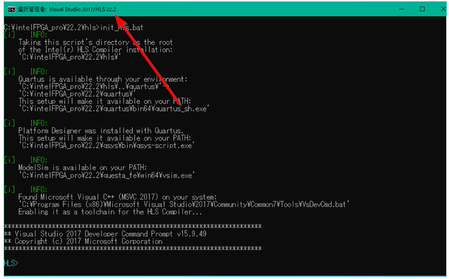
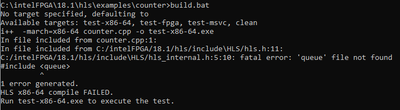
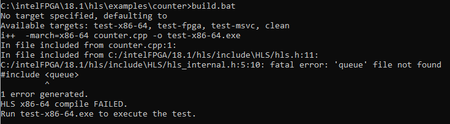
Hi Aik I'm now one step further. I now have downloaded and installed a new version of Quartus, including HLS compiler. I'm now runnning on: Quartus Prime Version 22.1std Intel HLS compiler version 21.4 When running the init_hls.bat I get the following result: After now successfully running the init, I tried again to run the 'counter' example from the HLS compiler installation. But I still get the same error when running the build command: Best Regards2.4KViews0likes0CommentsRe: Intel HLS compiler does not find includes
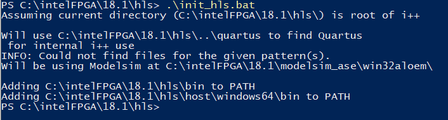
Dear Aik Thanks for your reply. Please find my answers to your questions below: I use Quartus version 18.1 I first had Visual Studion 2022 installed on my computer. To meet the requirements for the HLS compiler I did install additionally Microsoft Visual Studio Professional 2017 (version 15.9.55) The following screenshot shows the output of the init_hls.bat: It looks quite different from what is shown in the document picture. But I'm not sure if this is the root cause of my issue. Thanks for your help!2.4KViews0likes0CommentsRe: Intel HLS compiler does not find includes
Hi Aik Thanks for your reply! During my research of what could go wrong I already came across the link you have posted. In regards of the required tools I have already everything installed and setup. Depending on this it should already work, but it does not. I don't know how the HLS compiler knows which C++ compiler should be taken. I guess this is somewhere configured in the Quartus installation. Another thing I saw is that on the link you have posted, they use a special HLS command prompt from Visual Studio 2017. Do you know where I can start it from?2.5KViews0likes0CommentsIntel HLS compiler does not find includes
Hi everyone I am new to HLS and doing my first steps with the Intel HLS compiler. I am using Intel Quartus 18.1 which comes with an integrated HLS compiler and also provides with samples for people like me doing the first steps with it. To meet the pre-requisites for the HLS compiler I have installed Visual Studio 2017 Professional edition on my computer. Then followed the installation and initialization instructions from the Intel Website: https://www.intel.com/content/www/us/en/docs/programmable/683053/19-1/installing-the-standard-edition-on-microsoft.html After running the init_hls.bat I thought I am ready to run one of the first examples. So I picked the 'counter' project provided in the <quartus install dir>\hls\examples\counter folder. But when running the build.bat file I always encounter the following error: I did some research through the web to solve this issue. Some stated that a different command prompt should be used to overcome this issue. Some said that you need to specify the correct paths. But so far I was not able to solve this issue. Can someone give me a hint what I can do so that the HLS compiler is able to find the correct paths for the standard includes?821Views0likes1CommentIntel HLS compiler does not find includes
Hi everyone I am new to HLS and doing my first steps with the Intel HLS compiler. I am using Intel Quartus 18.1 which comes with an integrated HLS compiler and also provides with samples for people like me doing the first steps with it. To meet the pre-requisites for the HLS compiler I have installed Visual Studio 2017 Professional edition on my computer. Then followed the installation and initialization instructions from the Intel Website: https://www.intel.com/content/www/us/en/docs/programmable/683053/19-1/installing-the-standard-edition-on-microsoft.html After running the init_hls.bat I thought I am ready to run one of the first examples. So I picked the 'counter' project provided in the <quartus install dir>\hls\examples\counter folder. But when running the build.bat file I always encounter the following error: I did some research through the web to solve this issue. Some stated that a different command prompt should be used to overcome this issue. Some said that you need to specify the correct paths. But so far I was not able to solve this issue. Can someone give me a hint what I can do so that the HLS compiler is able to find the correct paths for the standard includes?Solved2.7KViews0likes8Comments