User Profile

DeepikaGanga
 New Contributor
Joined 4 years ago


User Widgets
Contributions
quartus_sh not working in Jenkins script
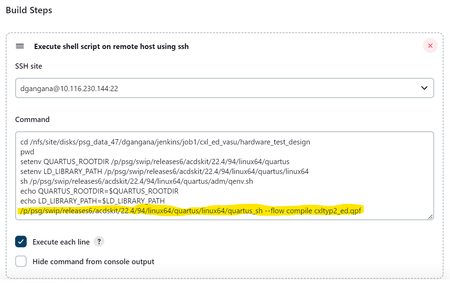
Hello, I am trying to create a jenkins script to build an existing quartus project. The following command works correctly from command line but when the same is added as a command in Jenkins job it doesn't work. Command : /p/psg/swip/releases6/acdskit/22.4/94/linux64/quartus/linux64/quartus_sh --flow compile cxltyp2_ed.qpf Other commands for setting env varibales Jenkins console output: The commands start off correctly But the job finishes without actually doing anything. The project is not compiled and no output_files folder created.916Views0likes0CommentsRe: oneAPI optimization report error
I am facing the same issue with Jupyter lab where I am not able to view the reports.html even after enabling the 'Trust HTML' option. Can you please point me to the FPGA forum link where this has been redirected. Also further info on how to zip and download the reports folder from the Jupyter notebook in order to view the HTML will be helpful.2KViews0likes0CommentsRe: Hough transform on Jupyter oneAPI DevCloud
Hi BB, I have another related question, please let me know if this needs to be raised as a separate ticket. How do we ensure these files are updated with correct code in the Hough transform application in the Jupyter notebook? The changes I have made are in my local view and not reflected to the main repository. Otherwise many users like me will be facing the same issue. Regards, Deepika3.1KViews1like0CommentsRe: Hough transform on Jupyter oneAPI DevCloud
Hi BB, Thanks for you response, sorry that you are not able to access my link. But yes, I think it is a clone of some repo, maybe from your earlier link. I was directed by someone to a github repository which seems to have a slightly different code including the fixes I mentioned earlier, but this file has many other changes as well. It is not clear how much of the changes need to be made to the Jupyter code in order for it to work. Here is the link to that file, hope this will be of some help. https://github.com/intel/fpga-training/blob/main/fpga_oneapi_lab/lab/hough_transform_local_mem.cpp Regards, Deepika3.1KViews1like0CommentsRe: Hough transform on Jupyter oneAPI DevCloud
Hi BB, Thanks for your response. The code in your link looks similar, however I got it from the Jupyter oneAPI notebook from this link : https://jupyter.oneapi.devcloud.intel.com/user/u149154/lab/tree/Hough_Transform_on_FPGAs_Using_oneAP... Regards, Deepika3.1KViews0likes0CommentsHough transform on Jupyter oneAPI DevCloud
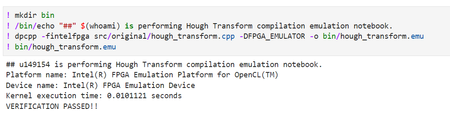
The Hough Transform code in the Jupyter oneAPI notebook on DevCloud is not working. The source code stated in the below link has multiple compilation and linker issues: https://jupyter.oneapi.devcloud.intel.com/user/u149154/lab/tree/Hough_Transform_on_FPGAs_Using_oneAP... Firstly the hough_transform.cpp has couple of compilation problems which I was able to address. With that the compilation is able to progress but there are some linker errors due to which I am unable to progress. Details of the errors are as follows: Compilation error: src/original/hough_transform.cpp:8:10: fatal error: 'CL/sycl/INTEL/fpga_extensions.hpp' file not found Fixes: Line 9 changed from #include <CL/sycl/INTEL/fpga_extensions.hpp> to #include <sycl/ext/intel/fpga_extensions.hpp> Line 72 and 76 changed from sycl::INTEL:: to sycl::ext::intel::fpga… Linker error: ## u149154 is performing Hough Transform compilation emulation notebook. /usr/bin/ld: cannot open output file bin/hough_transform.emu: No such file or directory dpcpp: error: linker command failed with exit code 1 (use -v to see invocation) /bin/bash: bin/hough_transform.emu: No such file or directory The ‘Device-Host Split’ file has similar issues which can be addressed in a similar way.Solved3.4KViews0likes11Comments- 635Views0likes1Comment