User Profile

Rodo
 Occasional Contributor
Joined 4 years ago


User Widgets
Contributions
Re: Can I run a MAX10 from external RAM instead of on-chip RAM?
I read this in AN730 after I posted this question. so I think it may not be possible. But I'm not sure (added Bold by me). ERAM and OCRAM seems to be the same thing. 1.5.2 Boot Option 3: Nios II Processor Application Executes in-place from OCRAM The on-chip memory is initialized during FPGA configuration with data from a Nios II application image. This data is built into the FPGA configuration bitstream, the programmer object file. This process eliminates the need for a boot copier, as the Nios II application is already in place at system reset. This option will not work in any of the following situations: • When you select a configuration mode that does not support ERAM initialization. • After a soft reset where the memory contents have been modified by the application and the application code has been corrupted. 1.2 Abbreviations Table 1. List of Abbreviations ERAM Embedded Random Access Memory1.1KViews0likes0CommentsCan I run a MAX10 from external RAM instead of on-chip RAM?
Hi all, This is for MAX10 (10M08), nios II, quartus lite v20.1.1 I can make a design in platform designer with a nios II, on-chip RAM, a few PIO and no flash, save it and use the programmer in quartus to program the sof file. Then, in eclipse I make an application that will toggle some of the PIO pins and use Run as...nios II hardware to program the software. This all works. I know I'm not programming the MAX10 flash. I don't have a flash IP in my design and when I disconnect/re-connect the power I have to program the sof file and application again. This is fine because I'm making changes as I work. I'm running out of on-chip RAM. Is there a way to use external RAM to do this? I would like use "Run as...nios II hardware" to program the software/application as I'm making several changes. I'm aware of AN730 but I don't see option 3 with external RAM. Thanks1.2KViews0likes2CommentsRe: MAX10, Nios 2: Intel FPGA Avalon I2C (Master) example ?
@ShengN_Intel: I don't know. I tried to add some code but I think I run out of (internal) RAM so I'm switching to external RAM but I'm having problems getting it to work. I'll go back to I2C when I get the external RAM to work. I suppose you can close this. I'll post a new question if I need to. Thanks.4.5KViews0likes0CommentsRe: Eclipse: Downloading ELF process failed?
I messed up the link after I removed some code to see if that would make the error go away. It didn't work. The numbers in the console change a bit but I still get the same error. Here is the link to the zip file: https://drive.google.com/file/d/10HNazopBa0eBX-z-1bhPSfDy83vJ__cK/view?usp=sharing Thanks.2.8KViews0likes0CommentsEclipse: Downloading ELF process failed?
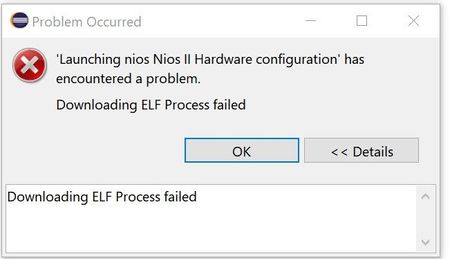
This is for MAX10 (10M08), nios2, Quartus Lite v20.1.1 (Free version). I have Quartus Lite 21.1 and eclipse but I had to install Quartus Lite 20.1 because I needed the sdram ip core which is not available in v21.1. Eclipse doesn't lunch from within Quartus 20.1, I dunno why. So I manually run it. I created a new workspace folder. I made a project with the sdram ip, nios, etc (Link to the project zip file). I can program the max10 configuration fine. I set a couple of leds on to show me that it is correct. It is. Now I'm trying to program the software from within eclipse but I keep getting the error in the picture below... the second picture is the console output. Can someone shed some light into my problem?2.8KViews0likes5CommentsRe: Where is the SDRAM controller IP in Quartus 21 Lite?
Well... after installing Quartus Lite v17.x thru 21.x I can say that the SDRAM controller IP core was removed from Quartus Lite v21.x. There is a message in the platform designer for Quartus Lite 20.x that says "... the SDRAM controller IP will only be included in Quartus Standard in future releases". Just in case you don't know: The "standard" version is one of the paid versions. So I'm downgrading to Quartus Lite v20.1.1.2.8KViews0likes0CommentsWhere is the SDRAM controller IP in Quartus 21 Lite?
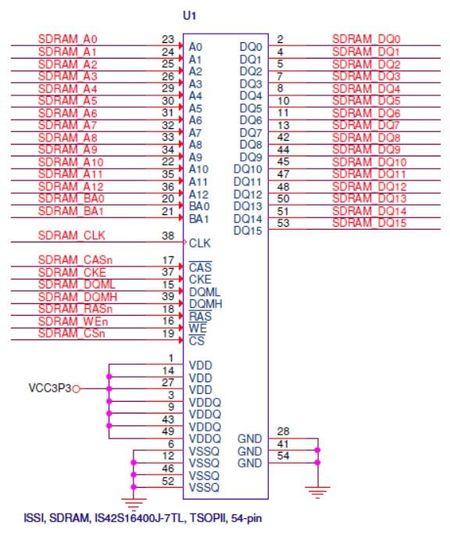
HI, This is for MAX10 (10M08), NIOS, BeMicro dev. board. I trying to get I2C core IP to work but I think my design run out of ram. I'm using the internal MAX10 ram now. I said I think because I don't get an error saying out of memory from eclipse. I just get a elf make file error. I created a new smaller project and added the I2C core and I didn't get any errors. I haven't gotten the I2C to work yet I just wanted to add the core to see if I got any errors. My dev. board has a SDRAM part: ISSI, IS42S16400J. I have an older project (for Quartus 15) with the SRAM IP core that worked but when I opened it in Quartus Lite 21 the upgrade window said that it couldn't find the ip core for the SDRAM controller. I found a link to an enhanced SDRAM controller but the help page says it is for Quartus 17. Is the SDRAM IP core available for Quartus Lite 21? If not, what version of Quartus Lite do I need? I don't mind downgrading if necessary. Here is the schematic of my dev. kit showing the SDRAM. Thanks2.9KViews0likes3CommentsRe: MAX10, Nios 2: Intel FPGA Avalon I2C (Master) example ?
Thanks but I got that part from a reply (comment) to my post at stackoverflow. How to instantiate in verilog : https://stackoverflow.com/questions/20066850/verilog-how-to-instantiate-a-module . It would be more helpful if the example you provided used the actual names for the intel i2c ip core. Curious, why you guys can offer this example but not a complete one? Are there any licensing issues? Thanks anyway.4.6KViews0likes0Comments