User Profile

JordanD
 New Contributor
Joined 5 years ago


User Widgets
Contributions
Re: FIR II Decimation Frequency Response
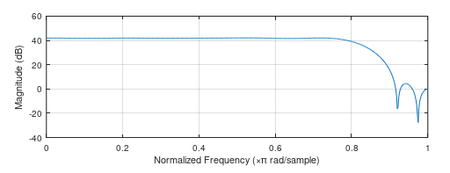
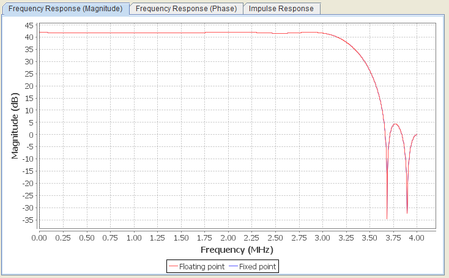
Hello @CheePin_C_Intel Thank you for response. I will respond to each of your items. Refer to the zip file attached earlier. Detailed steps From Matlab/Octave, set the directory to /decim_fir_sim and run the file fir_inspect. This will generate file decim_fir_input.txt. From ModelSim, set the directory to /decim_fir_sim. Enter command "do decim_fir_msim.tcl". This tcl script is provided with the IP, so you don't need to change anything. The IP testbench is already set to look for "decim_fir_input.txt" so it all just works. The sim automatically generates file "decim_fir_output.txt". From Matlab/Octave, run the same script again fir_inspect.m. This will read decim_fir_output.txt and make the plot. There are no changes to the default IP generated files. The Matlab script provided with the IP, decim_fir_model.m, generates the same output as the simulation. Beyond that, there's no use to using Matlab because it all depends what the data rate is. For example, grab coef_matrix_in from file decim_fir_mlab.m, and then run freqz(coef_matrix_in). This plots the expected frequency response, but the x axis is "normalized frequency". How does that map to what the IP is doing? That's the whole question.4.6KViews0likes0CommentsFIR II Decimation Frequency Response
I'm designing a filter with the FIR II IP. Input data rate is 64 MHz and decimation factor is 8. I want the frequency response to be low pass cut off at 3.2 MHz. The confusing thing is whether the IP interprets the coefficients at the input rate or the output decimated rate. I would think it is the input rate but the displayed frequency response on the wizard shows otherwise. I ran the provided test bench ("do decim_fir_msim.tcl") with a sweep of input frequencies and it does not match the wizard plot. Is the frequency axis in the wizard plot wrong, or am I missing something? Reference the attached Octave/Matlab script "fir_inspect.m" for simulation stimulus generation and output analysis. Design files also attached.4.8KViews0likes19CommentsRe: MIF loads on some builds and not others
Hello @RichardTanSY_Altera Yes, if I delete those folders, it works. But I don't want to have to do that before every build. I get the same results using Quartus 20.1 Lite (don't have license for Standard, trial license expired). I know how to work around the issue, but it's still concerning that there aren't warnings for when this problem happens. The problem is the path to the mif. My current set up is: In a custom VHDL file, I have altsyncram instantiation with INIT_FILE=>"apodWindow.mif" File apodWindow.mif is in the same directory as the VHDL file where altsyncram is instantiated. But this is not the qsf/qpf directory. The path to apodWindow.mif is specified in the qsf file: set_global_assignment -name MIF_FILE ../source/my_ram/apodWindow.mif I've attached three different projects. In project1, I replicated my project set up with the folder structure and everything. It exhibits the problem I'm having. In project2, I changed the INIT_FILE path to be relative to the qsf. In project3, I set up the RAM using the IP wizard, which involves a qip file and sets INIT_FILE relative to the qsf. I've attached images for synthesis results of each, with a clean build followed by a second build. All of them synthesize correctly on a clean build (no db or incremental_db folder). On the second build, all of them lack the critical warning about mif size. Only project1 fails to list the mif on the "Source Files Read" report, so project2 and project3 are viable solutions. However, Quartus really ought to give a warning of some kind that the file wasn't found in project1. It's exactly backwards: the critical warning appears when it found the file, and no warning appears when it didn't. Another curiosity: project3 (the wizard "right" way) in Source Files Read says a different path to the mif between builds, using absolute rather than relative. Is there any other solution here?1.7KViews0likes0Comments