User Profile

jozephka99
 Contributor
Joined 5 years ago


User Widgets
Contributions
Re: Max1000 Remote System Upgrade via SPI
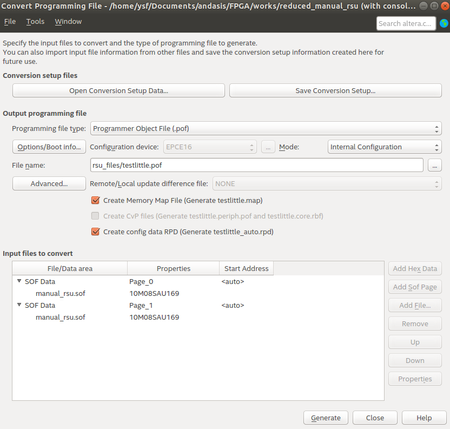
You can choose to send either in big endian or in little endian. But you have to write it to the FPGA in big endian format. Your data that send to me is in the little endian format. I also send it in little endian an convert it in the rsu_data function in my code. You can see it i reverse the bits there. But you can send it in big endian and erase this conversion so it is nicer I think. If you want to do this in big endian you have to generate the .rpd file in big endian format from the "Convert Programming File". In here, in "Options/Boot info..." you can change the format to big endian.24KViews0likes6CommentsRe: Max1000 Remote System Upgrade via SPI
Last counter value is not important. It is just waiting for restarting the device. You can change it. And AN741 is not complies with UG-MAX10-Configuration. In AN741 they assign reg 1 to 0x3 that means overwrite selected and Image 1 will be used. Also sorry, I made a mistake on that code. Here is the revised rsu_reconfig function: when rsu_reconfig => u_valid_in <= '0'; onchip_flash_csr_write <= '0'; if(cnt = 0) then db_avalon_address <= "001"; db_avalon_writedata(0) <= '1'; -- set config_sel_overwrite db_avalon_writedata(1) <= boot_cfm_sel; -- set config_sel db_avalon_writedata(31 downto 2) <= (others => '0'); -- reserved db_avalon_write <= '1'; db_avalon_read <= '0'; cnt <= cnt + 1; elsif(cnt = 3) then -- write operation needs 3 cycle db_avalon_write <= '0'; db_avalon_read <= '0'; cnt <= cnt + 1; elsif(cnt = 4) then db_avalon_address <= "011"; -- busy reg db_avalon_read <= '1'; db_avalon_write <= '0'; cnt <= cnt + 1; elsif(cnt = 5) then -- read operation needs 1 cycle db_avalon_read <= '0'; db_avalon_write <= '0'; cnt <= cnt + 1; elsif(cnt = 6) then -- read data came in 2th cycle if(db_avalon_readdata /= x"00000000") then -- if ufm/cfm busy cnt <= 4; -- go back until busy flag is over else cnt <= cnt + 1; end if; elsif(cnt = 250000000) then -- high cnt value because of CPU should read the RSU checksum acknowledge db_avalon_address <= "000"; -- trigger reconfig db_avalon_writedata <= x"00000001"; -- hold nconfig min 250ns, 4 cycle at 12 MHz db_avalon_write <= '1'; db_avalon_read <= '0'; cnt <= cnt + 1; else -- wait for FPGA trig reconfig cnt <= cnt + 1; end if;2.3KViews0likes0CommentsRe: Max1000 Remote System Upgrade via SPI
First you should know that I gather this timing informations from Intel's configuration user guide (https://www.intel.com/content/www/us/en/docs/programmable/683865/current/fpga-configuration-overview.html) and flash memory user guide (https://www.intel.com/content/www/us/en/docs/programmable/683180/18-0/user-flash-memory-overview.html). You should read them. Your cycle needs will change if your clock is different. After that: 1.Actually you just wait for 3 cycle for "write operation". I did this with using counter. Counter increases every clock cycle. So in 3. cycle it has been waited for 3 cycle = 250ns at 12MHz. 2.As I said you calculate the cycles recpect to your clock cycle. The important thing is the time (250ns) not the cycle count. And it is not an automatic command you drive the bits. If you clear the bits earlier, you may be dont get what you want. 3.Yes it has no continuation because 250ns after the writing the reconfig bits, the device must be restart itself. So I wait here until device restart itself and hold it for 60000000 cycles just for guarantee the operation. So you can change it at least min 250ns.2.4KViews0likes3CommentsRe: Max1000 Remote System Upgrade via SPI
As I said first you change the FPGA model from project settings. And then you do the other changes that I mentioned above. Then compile the code so you can see any other missing changes that might broke the compiling. I think you don't need to do lots of changes. You should read the whole code and try to understand it. It is actualy very easy now. And you should read the Intel documentations about the dual boot, on chip flash and rsu. They help you when you stuck in the code.2.6KViews0likes8CommentsRe: Max1000 Remote System Upgrade via SPI
1. You dont need to use a PLL for UART. The UART module in code does it itself. You just need to change the clock frequency which is going to UART module according to your fpga's clock freq. 2. I cut down the ram module and the unnececarry UFM operations from the code. It is now %15 at logic elements and %0 in memory. I'm adding the new project to attachment. But I remembered that before you send the rpd, you have to clear the CFM sector that rpd file is going to write. You can use erase operation from the code (selection 2 in operations) for this purpuse but i dont remember exact number of CFM sectors. UFM-CFMs ranging between 1-5 in total. So you can try it.2.6KViews0likes11Comments