User Profile

ScottShin
 Occasional Contributor
Joined 6 years ago


User Widgets
Contributions
modification Qsys
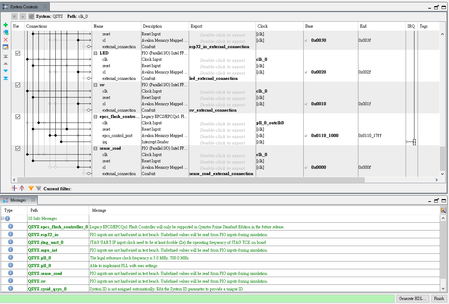
Hi everyone I'm working on a Terasic balance_car project in the DE10-NANO board by using Nios2.first of all, I using the BAL_CAR_Nios_Code project's demo code of Terasic, also add the EPCS Flash controller's IP in Qsys, it programs in EPCS64 and works successfully. Then I want to add PIO IP in Qsys, but it works not correctly, even my original function. Below is my step: 1.add PIO IP in QSYS (set five input) 2. click system>>assign base address 3.ctrl+s(save QSYS), and generate HDL 4.click close The steps in QSYS ------------------------------ ---------------------- 1.add export name in main code. 2.compilar(the pin was set already ). The steps in Quartus connect ------------------------------ ------------------- 1. In bsp folder: ''NIOS2">>"generate BSP" ->"clean project"-> Build project 2.In main.cpp folder: "NIOS2">>"Editor BSP" -> Build project The steps in Eclipse ------------------------------ -------- Finally, I combine .sof and .elf to .jic, and program on EPCS64, but this step already check is correct by trying another project. Hope anyone can find a mistake in my step. Thank's for anyone to give me advice. attach Terasic's demo project.Solved1.9KViews0likes4CommentsAdd IP in QSYS
I'm trying to change my nios2 by adding PIO IP in my Qsys, but the result is wrong. bellow is my step: 1.add PIO IP in QSYS (set five input) 2. click system>>assign base address 3.ctrl+s(save QSYS), and generate HDL The steps in QSYS ------------------------------ ---------------------- 1.add export name in main code. 2.compilar(the pin was set already ). The steps in Quartus ------------------------------ ------------------- 1. "clean project" -> ''NIOS2">>"generate BSP" -> Build project (in bsp folder) 2.''NIOS2">>"Editor BSP" -> Build project (in main.cpp folder) The steps in Eclipse ------------------------------ -------- final i combine .sof and .elf to .jic(this step is confirm ) thank's for anyone to give me adviceSolved1.2KViews0likes2Commentsnios2 eclipse an error has occurred.
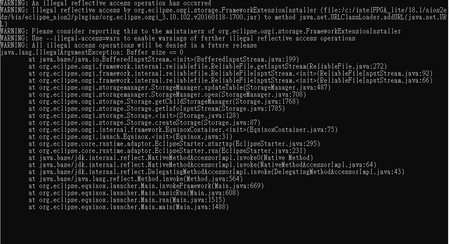
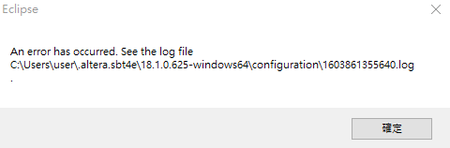
I deleted my workspace file to recreated the project, but when I attempt to start up the Nios II IDE, I see the splash screen, then a small dialogue box appears, saying: "An error has occurred. See the log file C:\User\user\.altera.sbt4e\18.1.0.625-windows64\configuration\1603861355640.log" I also reinstall quartus, but it didn't work. (my environment: Quartus prime lite 18.1 windows10-64bit ) Hope any advice will appreciate.Solved2.4KViews0likes3Comments