embedded - hard processor system (hps)
21 Topics
Why is the LPDDR5 option unavailable in the External Memory Interfaces for HPS IP in Quartus® Prime Pro Edition Software version 26.1.1 for Agilex® 3 SoC FPGA?
Description In Quartus® Prime Pro Edition Software version 26.1.1, the LPDDR5 option is not available in the External Memory Interfaces for HPS IP for Agilex® 3 SoC FPGA device because support for this option has not been enabled for the IP. Resolution A patch is available to resolve this issue in Quartus Prime Pro Edition Software version 26.1.1. To install the fix: Download Patch 1.02 for your operating system. Install Patch 1.02 into your Quartus Prime Pro Edition Software version 26.1.1. The patch files are available below: quartus-26.1.1-1.02-windows.exe quartus-26.1.1-1.02-linux.run After installing the patch, the option LPDDR5 will be available in the External Memory Interfaces for HPS IP for Agilex 3 SoC FPGA device.132Views0likes0Comments
Why do I see intermittent device recovery failures with error code 0x3ff in ASx4 configuration mode with HPS?
Description When configuring Agilex® 5 or Agilex® 3 SoC FPGAs in Active Serial x4 (ASx4) mode, intermittent device recovery failures with error code 0x3ff may occur if the mailbox interface is under heavy usage from the Hard Processor System (HPS). This issue is more likely to happen when nCONFIG is toggled multiple times in quick succession, particularly under stress or repeated reconfiguration scenarios. Resolution To minimize the chance of this error: Reduce mailbox traffic from the HPS during configuration and reconfiguration. If error 0x3ff occurs, reassert nCONFIG and attempt to reconfigure the device. In rare cases, if the error persists, a full power cycle of the device may be required to restore normal operation. The problem has been fixed starting with Quartus® Prime Pro Edition software version 25.3. For more details on configuration modes refer to the Device Configuration User Guide: Agilex® 5 FPGAs and SoCs or Device Configuration User Guide: Agilex® 3 FPGAs and SoCs, for error handling refer to Agilex® 5 Hard Processor System Technical Reference Manual or Agilex® 3 Hard Processor System Technical Reference Manual.125Views0likes0CommentsWhy is the HPS booting process on Agilex® 5 and Agilex® 3 SoC FPGA devices stuck at the U-boot stage?
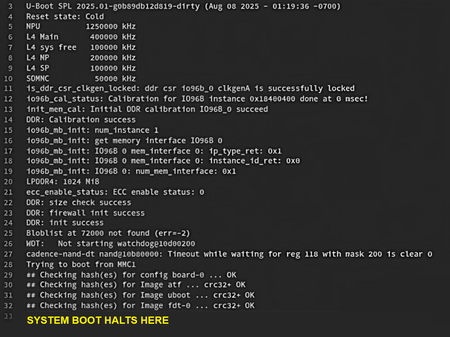
Description Due to a problem in the Agilex® 5 and Agilex® 3 SoC FPGA devices' HPS RAM Repair mechanism sequencing in Quartus® Prime Pro Edition Software version 25.3.1 and earlier, the HPS may fail to boot up normally after a RAM Repair happens. The failure signature is shown in the image below: Resolution To solve the issue, please consider the following options: Upgrade to Quartus® Prime Pro Edition Software 26.1 and newer. Which the fix is included. For Quartus version 25.3.1, apply the Quartus firmware patch attached in this KDB. For older Quartus version, contact Altera to check for the availability of patch. Additional Information Add these notes for the patches for Quartus® Prime Pro Edition Software version 25.3.1: Patches must be applied to the Quartus® Prime Pro Edition Software and the Quartus® Prime Pro Edition Software Programmer and Tools. Recompilation is not required. All programming files should be recreated. Re-run the programming file generation or conversion using the Quartus® Prime Software programming file generator.100Views0likes0CommentsWhy is the FPGA fabric unable to access the QSPI device through the SDM mailbox when ATF is used as the HPS bootloader in release 26.1 and earlier?
Description Due to the current implementation of Arm Trusted Firmware (ATF), BL31 retains ownership of the QSPI device after HPS boot in flows where ATF is used as the HPS bootloader (for example, ATF-to-Linux direct boot flow or bare‑metal boot flow). As a result, the FPGA fabric is unable to access the QSPI device through the SDM mailbox. This issue is observed in ATF releases 26.1 and earlier and affects Agilex® 7 FPGA, Agilex® 5 FPGA, and Agilex® 3 FPGA devices. Resolution There is no workaround for this issue. For Agilex® 5 FPGA and Agilex® 3 FPGA devices, this problem will be addressed in a future release by introducing an ATF build‑time switch that allows control over whether QSPI ownership is retained by or released from the HPS.100Views0likes0CommentsWhy does Agilex® 5 FPGA fail to boot Linux* from NAND when using the ATF-to-Linux direct boot flow in the 26.1 release?
Description Due to an issue with the SDRAM memory configuration in the Linux* device tree, the Agilex® 5 FPGA HPS fails to boot Linux from NAND when using the ATF-to-Linux direct boot flow in the 26.1 release (Linux branch socfpga-6.18.2-lts). This issue does not occur in the U-Boot–to-Linux boot flow, as U-Boot patches the Linux device tree with the correct memory configuration. In the ATF-to-Linux direct boot flow, ATF does not perform this patching; therefore, the memory configuration must be correctly defined in the device tree. Resolution To work around this issue, the Linux device tree used for booting from NAND in the ATF-to-Linux direct boot flow must be updated with the correct memory configuration. For the Premium Development Kit Production (065B and 065A), apply the following fix to arch/arm64/boot/dts/intel/socfpga_agilex5_socdk_nand_atfboot.dts: memory { device_type = "memory"; reg = <0 0x80000000 0 0x80000000>; }; Refer to the following build instructions for the workaround implementation: PDK 065B PDK 065A This problem is scheduled to be fixed in a future release of the Quartus® Prime Pro Edition Software.100Views0likes0CommentsWhy does EMIF for HPS LPDDR4 fail calibration on the Agilex® 5 FPGA and SoC FPGA?
Description In the Quartus® Prime Pro Edition Software 24.3, when configuring the Agilex® 5 FPGAs and SoC FPGAs with the EMIF for HPS IP and LPDDR4 device implemented as dual rank (2 chip selects), dual channels (i.e., 4 dies each being 16 Gbit in density), calibration can fail. Resolution This issue is fixed in 24.3.1 Quartus® Prime Pro Edition Software release. quartus-24.3-0.11-windows.exe quartus-24.3-0.11-linux.run quartus-24.3-0.11-readme.txt100Views0likes0CommentsWhy are there unexpected timing paths with HPS EMAC clocks in the timing report when HPS EMAC is routed to the FPGA?
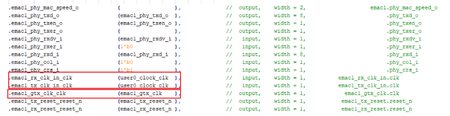
Description Due to a problem in the Quartus® Prime Pro Edition Software version 24.1 and earlier, you may see unexpected timing paths in the timing report for EMAC clocks when HPS EMAC is routed to the FPGA. Resolution The top entity below helps to understand the EMAC clocks, "emac1_gtx_clk" and "user0_clock_clk" used in the design, where EMAC1 is routed to the FPGA: To work around this problem, use the following SDC constraints: set_false_path -fall_from emac1_gtx_clk -rise_to emac1_gtx_clk set_false_path -fall_from emac1_gtx_clk -rise_to user0_clock_clk Additional Information The problem will be fixed in a future release of the Quartus® Prime Pro Edition Software.100Views0likes0CommentsWhy does Agilex® 5 FPGA fail to boot Linux* from eMMC when using the ATF-to-Linux direct boot flow in the 26.1 release?
Description Due to an issue with the SDRAM memory configuration in the Linux device tree, the Agilex® 5 FPGA HPS fails to boot Linux* from eMMC when using the ATF-to-Linux direct boot flow in the 26.1 release (Linux branch socfpga-6.18.2-lts). This issue is not observed in the U-Boot–to-Linux boot flow, as U-Boot patches the Linux device tree with the correct memory configuration. In the ATF-to-Linux direct boot flow, ATF does not perform this patching; therefore, the memory configuration must be correctly defined in the device tree. Resolution To work around this issue, the Linux device tree used for booting from eMMC in the ATF-to-Linux direct boot flow must be updated with the correct memory configuration. For the Premium Development Kit (ES and production), this requires updating the file arch/arm64/boot/dts/intel/socfpga_agilex5_socdk_emmc_atfboot.dts with the following fix: memory { device_type = "memory"; reg = <0 0x80000000 0 0x80000000>; }; Refer to the following build instructions for the workaround implementation: PDK 065B ES PDK 065B PDK 065A This problem is scheduled to be fixed in a future release of the Quartus® Prime Pro Edition Software.99Views1like0CommentsWhy does FPGA configuration (Phase 2) fail in HPS first boot mode on Agilex® 5 and Agilex® 3 SoC FPGAs when using Quartus® Prime Pro Edition Software version 25.3.1?
Description Due to a problem in Quartus® Prime Pro Edition Software version 25.3.1, Phase 2 configuration (FPGA fabric configuration from HPS) may fail on Agilex® 5 and Agilex® 3 FPGA devices when Phase 1 and Phase 2 bitstreams originate from different designs or design revisions. This is caused by HPS IO hash mismatches between compilations. Resolution To work around this problem, download and install the patch below. You must recompile both the design generating the Phase 1 bitstream and the design generating the Phase 2 bitstream using the patched version of Quartus® Prime Pro Edition Software version 25.3.1. The problem has been fixed starting with Quartus® Prime Pro Edition software version 26.1. Additional Information HPS IO hash mismatches can also occur for other reasons independent of this Quartus® Prime Pro Edition Software problem. For more information about other potential causes and how to avoid them, refer to the HPS IO Hash Compatibility section in the Hard Processor System Booting User Guide: Agilex™ 3 and Agilex™ 5 SoCs99Views1like0CommentsWhy does the MIPI link fail despite successful FPGA reconfiguration (Phase 2) in HPS First boot mode on Agilex® 5 or Agilex® 3 SoC FPGAs?
Description For HPS First Agilex® 5 or Agilex® 3 SoC FPGAs designs that include shared IO in the HPS EMIF banks, a firmware problem may cause the MIPI link to fail. This is due to the shared IO potentially getting stuck in reset after FPGA reconfiguration (Phase 2). This failure is not observed for FPGA First designs or designs that do not use shared IO. Refer to 3.5. Agilex® 5 EMIF IP for Hard Processor Subsystem (HPS) or A.1.13.1. Restrictions on I/O Bank Usage for Agilex® 3 EMIF IP with HPS for more information regarding IO sharing. Resolution The problem has been fixed starting with Quartus® Prime Pro Edition software version 25.3.99Views0likes0Comments